A Unique Stock Record is also known as a USR
It will inherit all characteristics of the parent Variant, except that it will also show the linked Customisations. These may be used just for [Stock Management](https://bookstack.iconography.co.uk/books/general/chapter/stock-management "Stock Management") and order fulfilment, or as a way of listing specific products for sale. These are managed via the [Inventory](https://bookstack.iconography.co.uk/books/categories/page/inventory "Inventory") tab, and may either be created there, or when a product with [Customisations](https://bookstack.iconography.co.uk/books/categories/page/customisation "Customisation") is added to a [Purchase Order](https://bookstack.iconography.co.uk/books/purchase-orders "Purchase Orders").Unless a Unique Stock Record is marked as enabled, its selling price will not be used in the POS, eCommerce or CMS. Instead, the default price of the Variant will be used
Unless a Unique Stock Record is marked as enabled, its cost price will not be used in the POS, eCommerce or CMS. Instead, the default price of the Variant will be used.
It is not possible to manually create a USR for a Variant with the same options as a USR for that Variant which already exists
## FAQs ### Will my USR pricing be displayed to customers? The answer is yes, but only if the USR is made live: ##### Live (POS) If set to be live in the POS, the USR will be presented as an option in the CMS and POS - if selected, the USR pricing will be used: [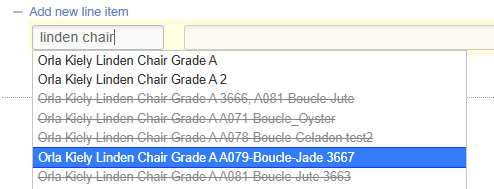](https://bookstack.iconography.co.uk/uploads/images/gallery/2026-09/iP4image.png) or [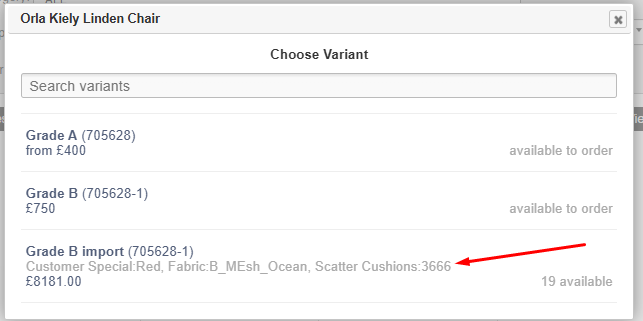](https://bookstack.iconography.co.uk/uploads/images/gallery/2026-09/yYDimage.png) If a salesperson happens to select the same combination of options through the wizards, that pricing will not be inherited. Once added, existing stock/Purchase Orders can be used to fulfil the Sales Order Line as normal. ##### Live (Web) If set to be live for web, the USR will be presented as an option in the CMS and on the eCommerce website - if selected, the USR pricing will be used. [](https://bookstack.iconography.co.uk/uploads/images/gallery/2026-09/iP4image.png) or[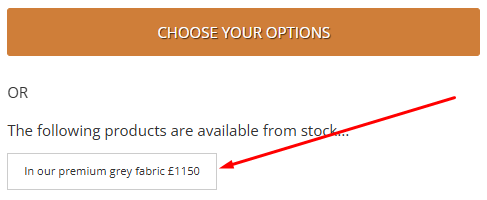](https://bookstack.iconography.co.uk/uploads/images/gallery/2026-09/TAwimage.png) Once added, existing stock/Purchase Orders can be used to fulfil the Sales Order Line as normal. ### How can I add a new Unique Stock Record? A full guide is available [here](https://bookstack.iconography.co.uk/adding-a-new-unique-stock-record). ### My Unique Stock Record is marked as disabled for eCommerce - will its stock be used? While free stock of an enabled USR will show to the customer as 'in stock', free stock relating to a disabled USR will not, and the customer will see a default lead time for the parent Variant. However, if a customer does purchase a Variant and select a combination of Customisations which match an existing USR with free stock, then that stock will be automatically allocated to that Sales Order Line regardless of USR status.