The Dashboard may be viewed inclusive or exclusive of VAT (with a couple of exceptions) - this is controlled through [Site Settings](https://bookstack.iconography.co.uk/books/site-settings "Site Settings"). All users must share the same view.
## Dashboard Blocks Your Dashboard is made up of a variety of widgets; this view is unique to each User based on their permissions. The Dashboard can be rearranged or individual widgets can be hidden as desired. There is a 'reset dashboard' button at the bottom of the screen. > Widget visibility is controlled via user permissions on the [Update User](https://bookstack.iconography.co.uk/books/update-users) screen. ### Baskets [](https://bookstack.iconography.co.uk/uploads/images/gallery/2024-09/kckimage.png) *Displays if the user is enabled for* [](https://bookstack.iconography.co.uk/uploads/images/gallery/2024-09/AqQimage.png) This will display the number of active eCommerce baskets on your website, along with a filtered clickthrough. *A conversion rate will also display if the user is enabled for* [](https://bookstack.iconography.co.uk/uploads/images/gallery/2024-09/Bk3image.png) The conversion rate is calculated as a percentage of converted Sales Orders with the Source of 'WEBSITE' (e.g. converted orders vs abandoned orders). ### Bandwidth [](https://bookstack.iconography.co.uk/uploads/images/gallery/2024-09/2gNimage.png) *Displays if the user is a* [](https://bookstack.iconography.co.uk/uploads/images/gallery/2024-09/7AFimage.png) Displays your [Bandwidth](https://bookstack.iconography.co.uk/books/general/page/bandwidth "Bandwidth") allowance, along with your usage so far this month compared to last month. > If your Bandwidth is consistently higher that your allowance, Iconography will be in touch to discuss increasing your allowance; if it is consistently over 100GB a month, we will mandate a dedicated server. ### Current Order BookThis will always display inclusive of VAT
[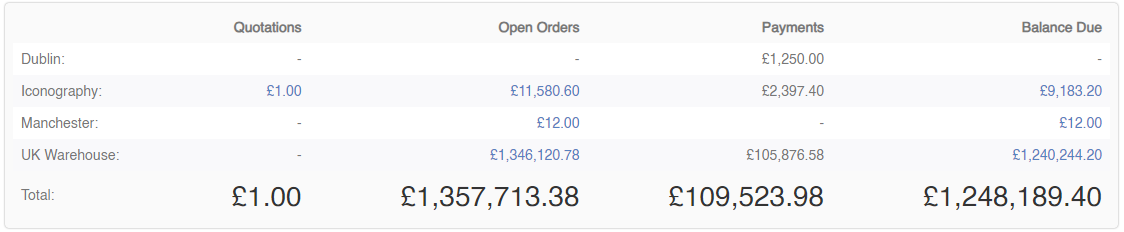](https://bookstack.iconography.co.uk/uploads/images/gallery/2024-09/0pFimage.png) *Displays if the user is enabled for* [](https://bookstack.iconography.co.uk/uploads/images/gallery/2024-09/3bCimage.png) This will display the total value of all (unexpired) Quotes. It also showsthe total value of open Sales Orders, along with a breakdown of current payments and outstanding balances against those Sales Orders. This will be broken down by [Store](https://bookstack.iconography.co.uk/books/stores "Stores"). ### Last 12 Months/Average Order Value [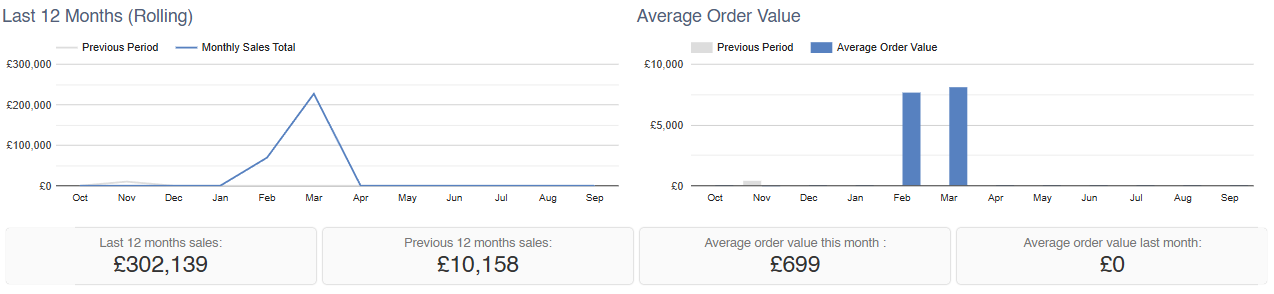](https://bookstack.iconography.co.uk/uploads/images/gallery/2025-10/KMbimage.png) *Displays if the user is enabled for* [](https://bookstack.iconography.co.uk/uploads/images/gallery/2024-09/OHGimage.png) #### Last 12 Months This will show year on year sales performance for the last 12 months. #### Average Order Value This will show year on year average order value for the last 12 months. ### Last 14 Days (Year on Year) [](https://bookstack.iconography.co.uk/uploads/images/gallery/2025-10/jHCimage.png) *Displays if the user is enabled for* [](https://bookstack.iconography.co.uk/uploads/images/gallery/2024-09/OHGimage.png) This will show year on year sales performance for the last 30 days. ### Orders [](https://bookstack.iconography.co.uk/uploads/images/gallery/2024-09/ydLimage.png) *Displays if the user is enabled for* [](https://bookstack.iconography.co.uk/uploads/images/gallery/2024-09/3bCimage.png) This displays orders which require action; each section is a link to process the highlighted Sales Orders. ### ProductsThe value of Total Stock Held will always show exclusive of VAT.
[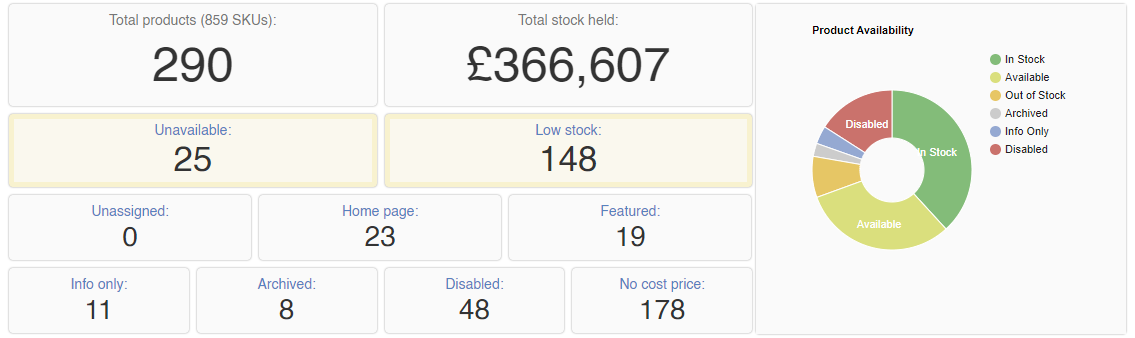](https://bookstack.iconography.co.uk/uploads/images/gallery/2024-09/vZFimage.png) *Displays if the user is enabled for* [](https://bookstack.iconography.co.uk/uploads/images/gallery/2024-09/X9vimage.png) This can be used to get a snapshot of your Products; it will also provide you with pre-filtered links to allow swift management of Products. ### Purchase Orders [](https://bookstack.iconography.co.uk/uploads/images/gallery/2024-09/rCkimage.png) *Displays if the user is enabled for* [](https://bookstack.iconography.co.uk/uploads/images/gallery/2024-09/Rz6image.png) This will display essential information about your Purchase Orders, along with quick links for immediate action as required. ### Recent Best Sellers [](https://bookstack.iconography.co.uk/uploads/images/gallery/2024-09/mosimage.png) *Displays if the user is enabled for* [](https://bookstack.iconography.co.uk/uploads/images/gallery/2024-09/X9vimage.png) Displays your recent Best Sellers. ### Returns [](https://bookstack.iconography.co.uk/uploads/images/gallery/2024-09/iO3image.png) *Displays if the user is enabled for* [](https://bookstack.iconography.co.uk/uploads/images/gallery/2024-09/X7rimage.png) This will display essential information about your Returns, along with quick links for immediate action as required. ### Sales (Weekly/Monthly/Yearly) [](https://bookstack.iconography.co.uk/uploads/images/gallery/2025-10/n0limage.png) *Displays if the user is enabled for* [](https://bookstack.iconography.co.uk/uploads/images/gallery/2024-09/OHGimage.png) ### Tasks [](https://bookstack.iconography.co.uk/uploads/images/gallery/2024-09/xscimage.png) *Displays if the user is enabled for* [](https://bookstack.iconography.co.uk/uploads/images/gallery/2024-09/GlQimage.png) This will show the total number of outstanding [Tasks](https://bookstack.iconography.co.uk/books/tasks) both companywide and for the current user, along with filtered click throughs. ### Today [](https://bookstack.iconography.co.uk/uploads/images/gallery/2025-10/S4timage.png) *Displays if the user is enabled for* [](https://bookstack.iconography.co.uk/uploads/images/gallery/2024-09/OHGimage.png) This will show the total value and number of sales across the whole system today.