# Text Blocks

Use this block to add large chunks of text to your page.

## Appearance

[![image.png](https://bookstack.iconography.co.uk/uploads/images/gallery/2024-11/scaled-1680-/xKTimage.png)](https://bookstack.iconography.co.uk/uploads/images/gallery/2024-11/xKTimage.png)

## Editing the Block

### Content

<table border="1" id="bkmrk-field-purpose-headin" style="border-collapse: collapse; width: 100%; height: 349.903px;"><colgroup><col style="width: 50%;"></col><col style="width: 50%;"></col></colgroup><thead><tr style="height: 29.6806px;"><td style="height: 29.6806px;">Field</td><td style="height: 29.6806px;">Purpose</td></tr></thead><tbody><tr style="height: 46.4722px;"><td style="height: 46.4722px;">Heading</td><td style="height: 46.4722px;">*Enter a short block title - this will show above the main content of the block*</td></tr><tr style="height: 46.4722px;"><td style="height: 46.4722px;">Body Text</td><td style="height: 46.4722px;">*This is the main content of the block. Use the controls to format your text*</td></tr><tr style="height: 96.8472px;"><td style="height: 96.8472px;">Link URL</td><td style="height: 96.8472px;">*Enter a link URL - if populated, this will add a call to action below the content of the block.*

*The position of this button can be controlled with the 'Link Position' control*

</td></tr><tr style="height: 130.431px;"><td style="height: 130.431px;">Link Text</td><td style="height: 130.431px;">*Enter link text - if populated, this will change the text in a call to action below the content of the block*

*The position of this button can be controlled with the 'Link Position' control*

*If left blank, the button will read 'More'*

</td></tr></tbody></table>

### Settings

<table border="1" id="bkmrk-field-purpose-block-" style="width: 92.7381%;"><thead><tr><td style="width: 45.7196%;">Field</td><td style="width: 54.2662%;">Purpose</td></tr></thead><tbody><tr><td style="width: 45.7196%;">Block Width</td><td style="width: 54.2662%;">*Choose from:*

- *25%*
- *33%*
- *50%*
- *66%*
- *75%*
- *100%*
- *Full Width (set to always be the full width of the user's device)*

</td></tr><tr><td style="width: 45.7196%;">Visibility</td><td style="width: 54.2662%;">*Set the block visibility from the list:*

- *Default (both)*
- *Desktop Only*
- *Mobile Only*
- *Hidden (none)*

</td></tr><tr><td style="width: 45.7196%;">Heading Position</td><td style="width: 54.2662%;">*Alter the alignment of the block header:*

- *Left*
- *Central*
- *Right*

</td></tr><tr><td style="width: 45.7196%;">Link Position</td><td style="width: 54.2662%;">*Alter the alignment of the link button:*

- *Left*
- *Central*
- *Right*

</td></tr></tbody></table>

#### Additional Options

<table border="1" id="bkmrk-field-purpose-collap" style="border-collapse: collapse; width: 100%; height: 59.3612px;"><colgroup><col style="width: 50%;"></col><col style="width: 50%;"></col></colgroup><thead><tr style="height: 29.6806px;"><td style="height: 29.6806px;">Field</td><td style="height: 29.6806px;">Purpose</td></tr></thead><tbody><tr style="height: 29.6806px;"><td style="height: 29.6806px;">Collapsible</td><td style="height: 29.6806px;">If set to yes, the whole Text block will be set as collapsible (see below)

[![image.png](https://bookstack.iconography.co.uk/uploads/images/gallery/2024-11/scaled-1680-/y9Wimage.png)](https://bookstack.iconography.co.uk/uploads/images/gallery/2024-11/y9Wimage.png)
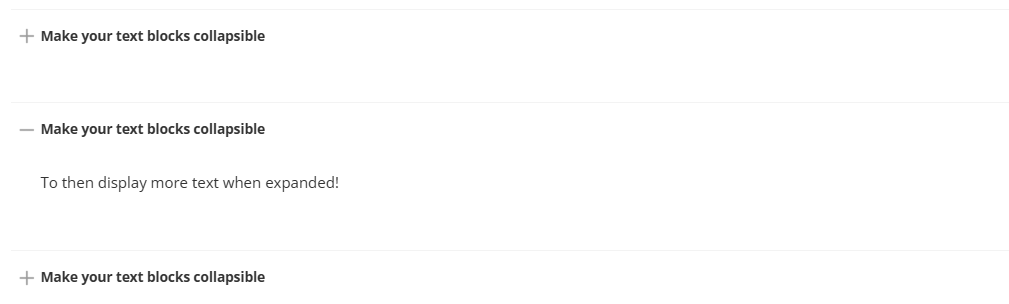
<p class="callout success">Doing so will also adjust the Schema of the block; this will be flagged to search engines as an FAQ; the block Heading will be labelled as the question, and the Body Text as the answer</p>

</td></tr></tbody></table>

<span style="font-family: var(--font-heading, var(--font-body)); font-size: 2.333em; font-weight: 400;">Advanced</span>

#### Padding

Adding padding will insert space within the current block; this will adjust the position of content within the block.

More information is available [here](https://bookstack.iconography.co.uk/books/general/page/padding).

#### Margin

The margin will add additional space around the current block.

More information is available [here](https://bookstack.iconography.co.uk/books/general/page/margin).