Groups may be exported as part of integrations with 3rd party marketing platforms
#### Key to icons  = edit  = delete  = download ## Group TypesTypically a Group would be a form of communication, e.g. 'SMS', 'Email', 'Post', or a segmentation based on other factors, e.g. 'Bought in the last 3 Months', or Average Spend over £500'.
### Public A Public Group is one that will be displayed to the Customer on your website. This will allow them to opt in to that group for associated communication. You could use these to encourage a Customer to select their interests, e.g. Public Groups for Brand or Category specific content.We recommend that you have at least one Public Group for your email marketing, e.g. 'Newsletter', or 'Email'.
These will display as options at account registration: [](https://bookstack.iconography.co.uk/uploads/images/gallery/2025-11/18Yimage.png) ### Private A Private Group will not be displayed to the Customer on your website. They can only be added to Private Groups manually in the CMS or POS. These should be used to segment your audience, but might also be used in-store to track other contact preferences, e.g. [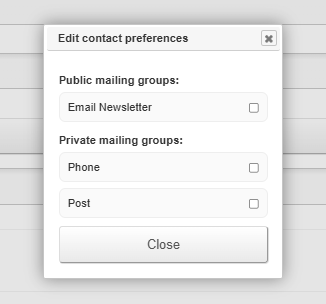](https://bookstack.iconography.co.uk/uploads/images/gallery/2025-11/vHpimage.png)We recommend that you have at least one Group for each contact type, e.g. 'SMS', 'Email', 'Phone', etc., in order to comply with GDPR.
### Dynamic Dynamic Groups are automatically populated with Customers and Site Visitors. It is not possible to for a Customer to opt in to these, or for an Administrator to manually add Customer to one. In addition, these will never be displayed to a Customer. #### Setup When building a Dynamic Group, you will need to add one or more rules; these will govern which Customers are assigned to that Dynamic Group. In the example below, this would create a Group populated with customers who signed up since the 1st November, but have not yet placed an order: [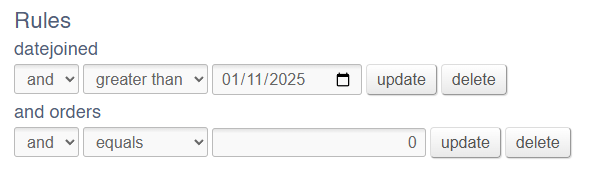](https://bookstack.iconography.co.uk/uploads/images/gallery/2025-11/Z3cimage.png) In this example, the group would contain anyone who had searched, viewed, added to basket or added to wishlist Sony Products: [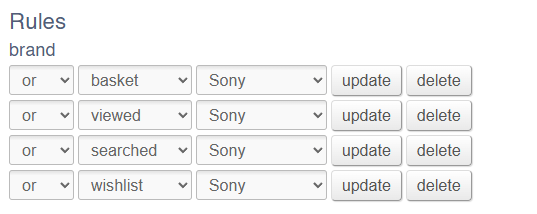](https://bookstack.iconography.co.uk/uploads/images/gallery/2025-11/FLXimage.png) #### Customers Customers will be automatically populated based on those rules, and displayed at the bottom of the page. [](https://bookstack.iconography.co.uk/uploads/images/gallery/2025-11/mw2image.png) These may be exported as a CSV. #### Anonymous Guest Users If a Customer meets the criteria, but is not logged into a registered account, they will still be added into the group via a cookie. When they return to the site from their device, they will be automatically treated as being in the Customer Group, even though they are anonymous. ### Uses #### Marketing Customer Groups can be used to segment your Customers as well as providing a record of marketing opt in. #### Personalised Content Customer Groups can be used to personalise content for Customers; use these to restrict which [Banners](https://bookstack.iconography.co.uk/books/banners "Banners") and [Popups](https://bookstack.iconography.co.uk/books/popups "Popups") are visible to specific Customer Groups.