# Customisations (AKA 'Made to Order')

This may be used as an Import or an Export option.

The file looks like this:

[![image.png](https://bookstack.iconography.co.uk/uploads/images/gallery/2025-09/scaled-1680-/9Mlimage.png)](https://bookstack.iconography.co.uk/uploads/images/gallery/2025-09/9Mlimage.png)

### Export

Use the filters to narrow your selection, then click 'Export'. This will generate a file that will include all Customisations for products that match your filters.

[![image.png](https://bookstack.iconography.co.uk/uploads/images/gallery/2025-09/scaled-1680-/YMYimage.png)](https://bookstack.iconography.co.uk/uploads/images/gallery/2025-09/YMYimage.png)

### Import

Make changes to the file and import it to update Products. Any changes here will be added to existing Customisations.

It is possible to remove existing Customisations when you upload a file by using he 'remove existing MTO options tickbox'.

<p class="callout danger">Please be aware that removing Customisations in bulk is risky and could result in Customisations being removed incorrectly.</p>

<table border="1" id="bkmrk-field-purpose-code-t" style="border-collapse: collapse; width: 100%; height: 1148px;"><colgroup><col style="width: 50.0477%;"></col><col style="width: 50.0477%;"></col></colgroup><thead><tr style="height: 29.6px;"><td style="height: 29.6px;">Field</td><td style="height: 29.6px;">Purpose</td></tr></thead><tbody><tr style="height: 46.4px;"><td style="height: 46.4px;">Code

</td><td style="height: 46.4px;">*The SKU Code of the Variant to which the Customisations are linked*</td></tr><tr style="height: 137.6px;"><td style="height: 137.6px;">Product</td><td style="height: 137.6px;">*The Product Name to which the Customisations are linked - Variant Option Values are also appended to this, to differentiate between Variants*

<p class="callout info">*This is for reference purposes only, and changes here will not be updated within the system.*</p>

</td></tr><tr style="height: 92.8px;"><td style="height: 92.8px;">Option Name</td><td style="height: 92.8px;">*The Name associated with the Customisation, e.g. 'Size' or 'Colour'*

<p class="callout info">*Adding a new entry here may create a new [Option](https://bookstack.iconography.co.uk/books/options "Options")*</p>

</td></tr><tr style="height: 29.6px;"><td style="height: 29.6px;">Option Value</td><td style="height: 29.6px;">*The Value associated with the Customisation, e.g. 'Small' or 'Red'*</td></tr><tr style="height: 120.8px;"><td style="height: 120.8px;">Option Price</td><td style="height: 120.8px;">*The additional price to the customer associated with this Customisation, e.g. selecting 'Gold Feet' may add £49.99 to the price*

<p class="callout warning">*Enter in this format only: '0.00'*</p>

</td></tr><tr><td>  
</td><td>*Additional value to be added to the Special Offer price of the Variant*

<p class="callout info">*This will only apply during a Special Offer period, as defined by the Variant*</p>

<p class="callout warning">*Enter in this format only: '0.00'*</p>

</td></tr><tr style="height: 104px;"><td style="height: 104px;">Option Percent</td><td style="height: 104px;">*The additional price to the customer associated with this Customisation, e.g. selecting 'Cotton' may add 10% to the price*

<p class="callout warning">*Enter in this format only: '0.00'*</p>

</td></tr><tr style="height: 104px;"><td style="height: 104px;">Option Cost</td><td style="height: 104px;">*The additional cost associated with this Customisation, e.g. selecting 'Gold Feet' may add £49.99 to the price*

<p class="callout warning">*Enter in this format only: '0.00'*</p>

</td></tr><tr style="height: 92.8px;"><td style="height: 92.8px;">Swatch Group</td><td style="height: 92.8px;">*The Swatch Group linked to this Customisation.*

<p class="callout info">*Adding a new entry here may create a new [Swatch Group](https://bookstack.iconography.co.uk/books/swatches/page/swatch-groups "Swatch Groups")*</p>

</td></tr><tr style="height: 160px;"><td style="height: 160px;">Swatch Name</td><td style="height: 160px;">*The Swatch Group linked to this Customisation.*

*On upload, if a Swatch Name matching this entry exists within the Swatch Group (see above), that Swatch will be linked to this customisation.*

<p class="callout info">*Adding a new entry here may create a new [Swatch](https://bookstack.iconography.co.uk/books/swatches/page/swatches "Swatches")*</p>

</td></tr><tr style="height: 137.6px;"><td style="height: 137.6px;">Swatch Image</td><td style="height: 137.6px;">*The link to the Swatch Image that is linked to this Customisation*

<p class="callout info">*If you are creating a new Swatch Group, or there is no Swatch with a corresponding Swatch Name within an existing Swatch Group, and you have entered a link here, it will import that Swatch Image and create a new Swatch*</p>

</td></tr><tr style="height: 29.6px;"><td style="height: 29.6px;">Image Link Ref</td><td style="height: 29.6px;">This shows a link to an existing Variant Image, if one exsists</td></tr><tr><td>POS Only</td><td>*Toggles whether this particular Customisation Value is available to eCommerce Customers*</td></tr><tr style="height: 63.2px;"><td style="height: 63.2px;">Child Option</td><td style="height: 63.2px;">*Use this to set up interrelated options, e.g. choices for 'Choose Pattern/Plain' could lead to Child Options of 'Choose Plain Colour' and 'Choose Pattern Colour'*</td></tr></tbody></table>

#### Mapping

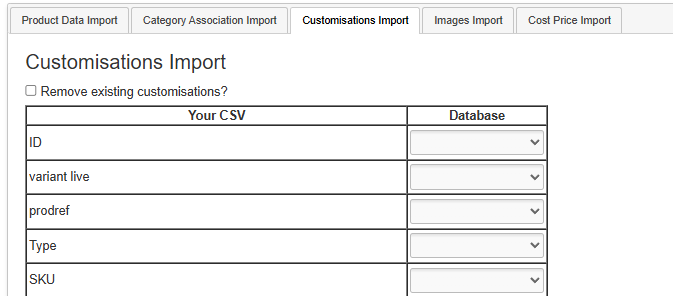
You will need to map your data before it can be imported. Included below is the optimal mapping/spreadsheet structure.

<p class="callout danger">Mistakes made here may have serious impact on your Product database.</p>

<p class="callout danger">Please be aware that removing Customisations in bulk is risky and could result in Customisations being removed incorrectly unless done with care. </p>

[![image.png](https://bookstack.iconography.co.uk/uploads/images/gallery/2026-03/scaled-1680-/DB2image.png)](https://bookstack.iconography.co.uk/uploads/images/gallery/2026-03/DB2image.png)