It is possible to use this feature to edit existing products *and* create new products
### File Types There are six file types: - [Product (Variant)](https://bookstack.iconography.co.uk/books/import-export/page/product-data "Products") - [Category Association](https://bookstack.iconography.co.uk/books/import-export/page/category-association "Category Association") - [Customisations](https://bookstack.iconography.co.uk/books/import-export/page/customisations-aka-made-to-order "Made to Order options (Customisations)") - [Unique Stock Records](https://bookstack.iconography.co.uk/books/import-export/page/unique-stock-records-aka-usrs "Unique Stock Records (AKA USRs)") - [Images](https://bookstack.iconography.co.uk/books/import-export/page/images "Images Import") - [Cost Prices](https://bookstack.iconography.co.uk/books/general/page/cost-prices "Cost Prices")There are additional exports and imports, including ones for [Price Management](https://bookstack.iconography.co.uk/books/price-management "Price Management"), [Purchase Orders](https://bookstack.iconography.co.uk/books/purchase-orders "Purchase Orders") and via the [Bulk Update](https://bookstack.iconography.co.uk/books/bulk-update "Bulk Update") and [Product Lookup](https://bookstack.iconography.co.uk/books/product-lookup "Product Lookup") tools; all of these files may be imported here
### Field Mapping When importing a file, you will need to ensure that the columns in your spreadsheet are mapped to IXO Commerce database fields. Your column headers will be shown on the left hand side of a table; choose from the drop down to match to a field.Mistakes made here may have serious impact on your Product database.
[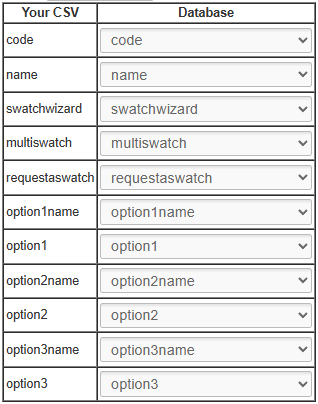](https://bookstack.iconography.co.uk/uploads/images/gallery/2025-10/22gimage.png) IXO Commerce will attempt to match fields to columns based where possible. > When managing Product (Variant) imports, it is also possible to create pre-sets ### FAQs #### When will a new Product be created? If you are uploading a Product (Variant) import, the system will perform a lookup for the SKU codes in your spreadsheet. If the SKU code exists, that Variant will be updated to match the data in your spreadsheet. If it does not exist, a new one will be created. ####