# Unique Stock Records (AKA USRs)

This may be used as an import or an export.

The file looks like this:

[![image.png](https://bookstack.iconography.co.uk/uploads/images/gallery/2026-07/scaled-1680-/Lzoimage.png)](https://bookstack.iconography.co.uk/uploads/images/gallery/2026-07/Lzoimage.png)

### Import

Amend your file and upload it; this will update USRs which are in the file, based on Barcode.

<table border="1" id="bkmrk-field%C2%A0-purpose-code-" style="border-collapse: collapse; width: 100%; height: 298.785px;"><colgroup><col style="width: 49.881%;"></col><col style="width: 49.881%;"></col></colgroup><thead><tr style="height: 29.8785px;"><td style="height: 29.8785px;">Field </td><td style="height: 29.8785px;">Purpose</td></tr></thead><tbody><tr style="height: 29.8785px;"><td style="height: 29.8785px;">code</td><td style="height: 29.8785px;">Read only - this is use to identify the related Variant</td></tr><tr style="height: 29.8785px;"><td style="height: 29.8785px;">barcode</td><td style="height: 29.8785px;">Read only - this is used to identify the USR that needs to be updated</td></tr><tr style="height: 29.8785px;"><td style="height: 29.8785px;">label</td><td style="height: 29.8785px;">Use this to set the USR Label

This may also be referred to as the 'sub variant label'

</td></tr><tr style="height: 29.8785px;"><td style="height: 29.8785px;">price</td><td style="height: 29.8785px;">Use this to set the Price of the USR

This will only be used where it is enabled (see below)

</td></tr><tr style="height: 29.8785px;"><td style="height: 29.8785px;">specialprice</td><td style="height: 29.8785px;">Use this to set the Special Offer Price of the USR

This will only be used where it is enabled (see below)

</td></tr><tr style="height: 29.8785px;"><td style="height: 29.8785px;">rrp</td><td style="height: 29.8785px;">Use this to set the RRP of the USR

This will only be used where it is enabled (see below)

</td></tr><tr style="height: 29.8785px;"><td style="height: 29.8785px;">trade\_price</td><td style="height: 29.8785px;">Use this to set the Trade Price of the USR

This will only be used where it is enabled (see below)

</td></tr><tr style="height: 29.8785px;"><td style="height: 29.8785px;">trade\_specialprice</td><td style="height: 29.8785px;">Use this to set the Trade Special Offer Price of the USR

This will only be used where it is enabled (see below)

</td></tr><tr style="height: 29.8785px;"><td style="height: 29.8785px;">trade\_rrp</td><td style="height: 29.8785px;">Use this to set the Trade RRP of the USR

This will only be used where it is enabled (see below)

</td></tr><tr><td>costprice</td><td>Use this to set the Cost Price of the USR

This will only be used where it is enabled (see below)

<p class="callout warning">This will not be editable if you have the 'multiple suppliers' config enabled</p>

</td></tr><tr><td>vlive</td><td>This sets whether the USR is live on your website; choose from

- yes
- no

</td></tr><tr><td>vlivepos</td><td>This sets whether the USR is live in your POS; choose from

- yes
- no

</td></tr></tbody></table>

### Export

Use the filters to narrow your selection, then click 'Export'. This will generate a file that will include all Customisations for products that match your filters.

[![image.png](https://bookstack.iconography.co.uk/uploads/images/gallery/2026-07/scaled-1680-/JlFimage.png)](https://bookstack.iconography.co.uk/uploads/images/gallery/2026-07/JlFimage.png)

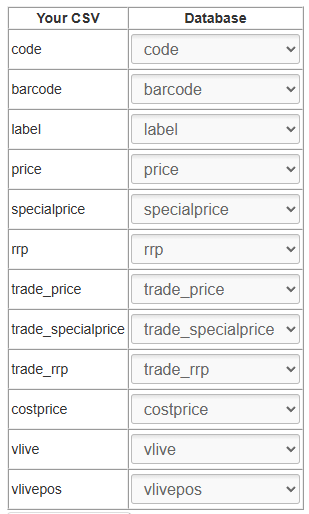
#### Mapping

You will need to map your data before it can be imported. Included below is the optimal mapping/spreadsheet structure.

<p class="callout danger">Mistakes made here may have serious impact on your Product database.</p>

### [![image.png](https://bookstack.iconography.co.uk/uploads/images/gallery/2026-07/scaled-1680-/O0Gimage.png)](https://bookstack.iconography.co.uk/uploads/images/gallery/2026-07/O0Gimage.png)