'Payment Date' for pending payment (e.g. finance orders) will be taken as the date that the payment was completed
## Real Time Data ### Are the reports up to date? All reports show a snapshot of data at the instant that they were generated. As such, they are always up to date. ### The value of a Sales Order has changed; how will this be reflected in the reporting? With the exception of Sales by User, all revenue reporting is done based on the Sales Order date. That means that a Sales Order that has a date of the 1st of October will always report its revenue as the 1st of October, even if new lines are added on the 1st November. ### The Salesperson on a Sales Order has changed; how will this be reflected in the reporting? This will immediately update and change all reports. This will adjust how reports are filtered, and will also have a direct impact on the Sales by User report. ### The Store on a Sales Order has changed; how will this be reflected in the reporting? This will immediately update and change all reports. This will adjust how reports are filtered, and will also have a direct impact on the Sales by Channel report. ## General ### Are Reports sortable? All reports are sortable - simply click on the headers. ### Can a report be exported? All reports are exportable as a CSV. ### Why are some results 'N/A' or simply blank? This will be due to missing information, e.g. products that are sold which have not been assigned to a Department, or to a Brand with a blank entry in the name. # Payment Summary This report will show a breakdown of company-wide payments within a given period. This will include a summary of: - Total payments by transactions type - Total value of cancellations/returns - Summary of payments per user - VAT breakdown of payments made - Summary of payments made, by payment type'Payment Date' for pending payment (e.g. finance orders) will be taken as the date that the payment was completed
This reporting excludes [cancelled payments](https://bookstack.iconography.co.uk/books/sales-orders/page/existing-payments)
[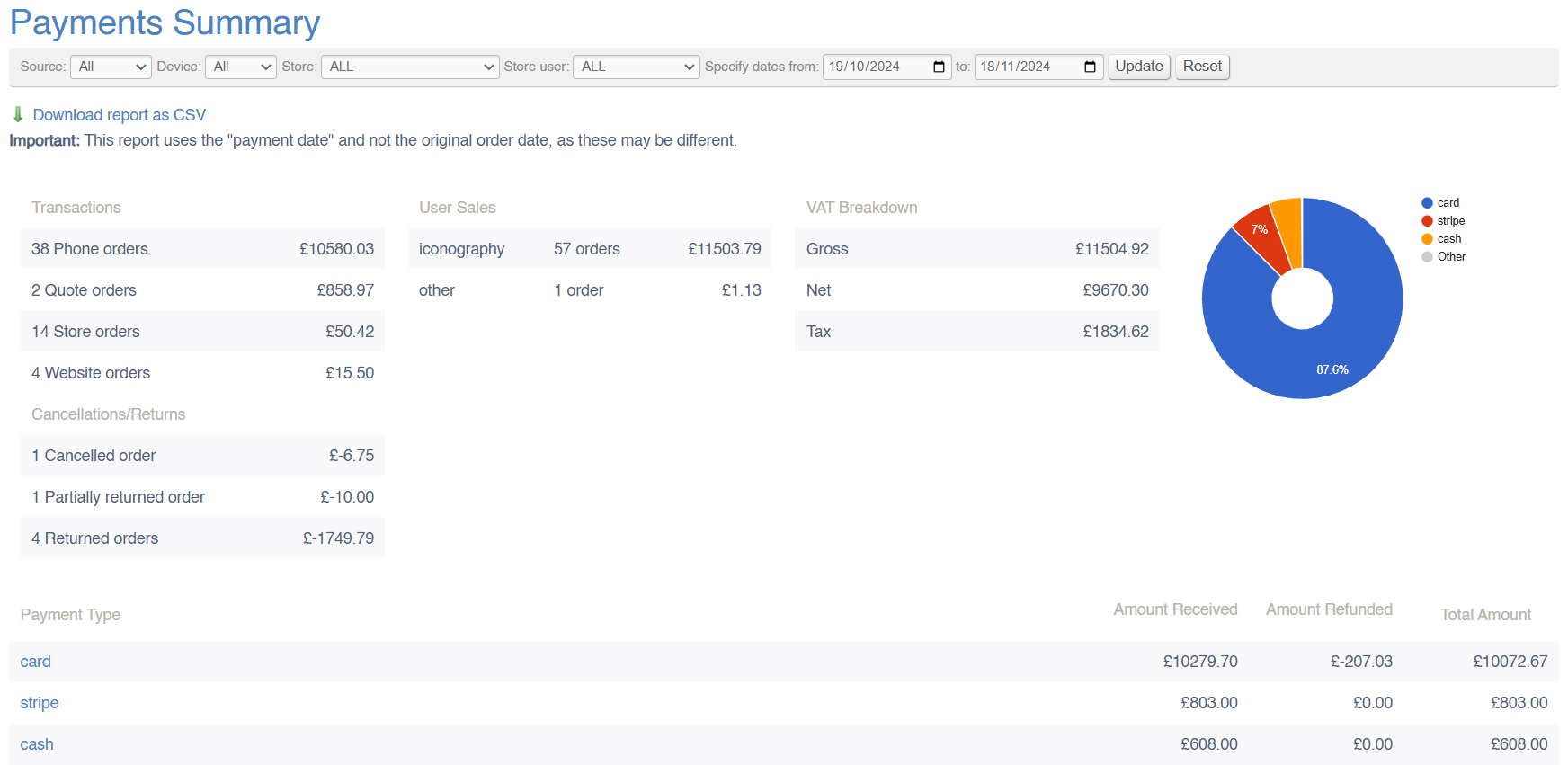](https://bookstack.iconography.co.uk/uploads/images/gallery/2024-11/b5Qimage.png) #### Filters This report may be filtered by: - Date Range - Source - Device - Store - Store User #### Key to icons  = download report ### FAQs FAQs for Payment Reports may be viewed [here](https://bookstack.iconography.co.uk/books/payment-reports/page/faqs "FAQs"). # Payment by Date This report will show a breakdown of company-wide payments within a given period. This information will be broken down by date. Data may be viewed by: - Day - Week - Month Clicking on a date will open the [Transaction Report](https://bookstack.iconography.co.uk/books/payment-reports/page/transactions), filtered to that date.'Payment Date' for pending payment (e.g. finance orders) will be taken as the date that the payment was completed
This reporting excludes [cancelled payments](https://bookstack.iconography.co.uk/books/sales-orders/page/existing-payments)
[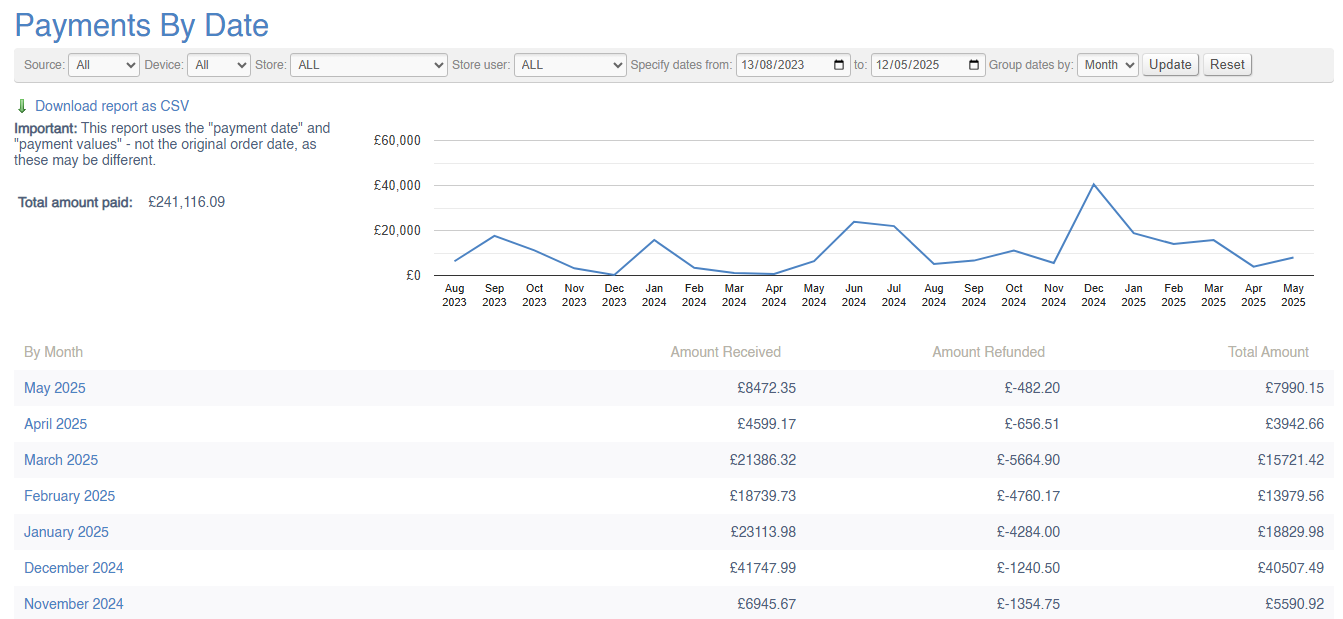](https://bookstack.iconography.co.uk/uploads/images/gallery/2025-09/oBqimage.png) #### Filters This report may be filtered by: - Date Range - Source - Device - Store - Store User #### Key to icons  = download report ### FAQs FAQs for Payment Reports may be viewed [here](https://bookstack.iconography.co.uk/books/payment-reports/page/faqs "FAQs"). # Transactions This report will show a breakdown of company-wide payments within a given period. This will include the detail of all payments logged within the specified date ranges. Each payment (or refund) will be listed individually.'Payment Date' for pending payment (e.g. finance orders) will be taken as the date that the payment was completed
This reporting excludes [cancelled payments](https://bookstack.iconography.co.uk/books/sales-orders/page/existing-payments)
Where payments are added via the POS, if the User has enabled a receipt printer in Device Settings, the Label for that Printer will be logged under the till column. If no data is entered in that column, this signifies that the entry was a Back Office payment. [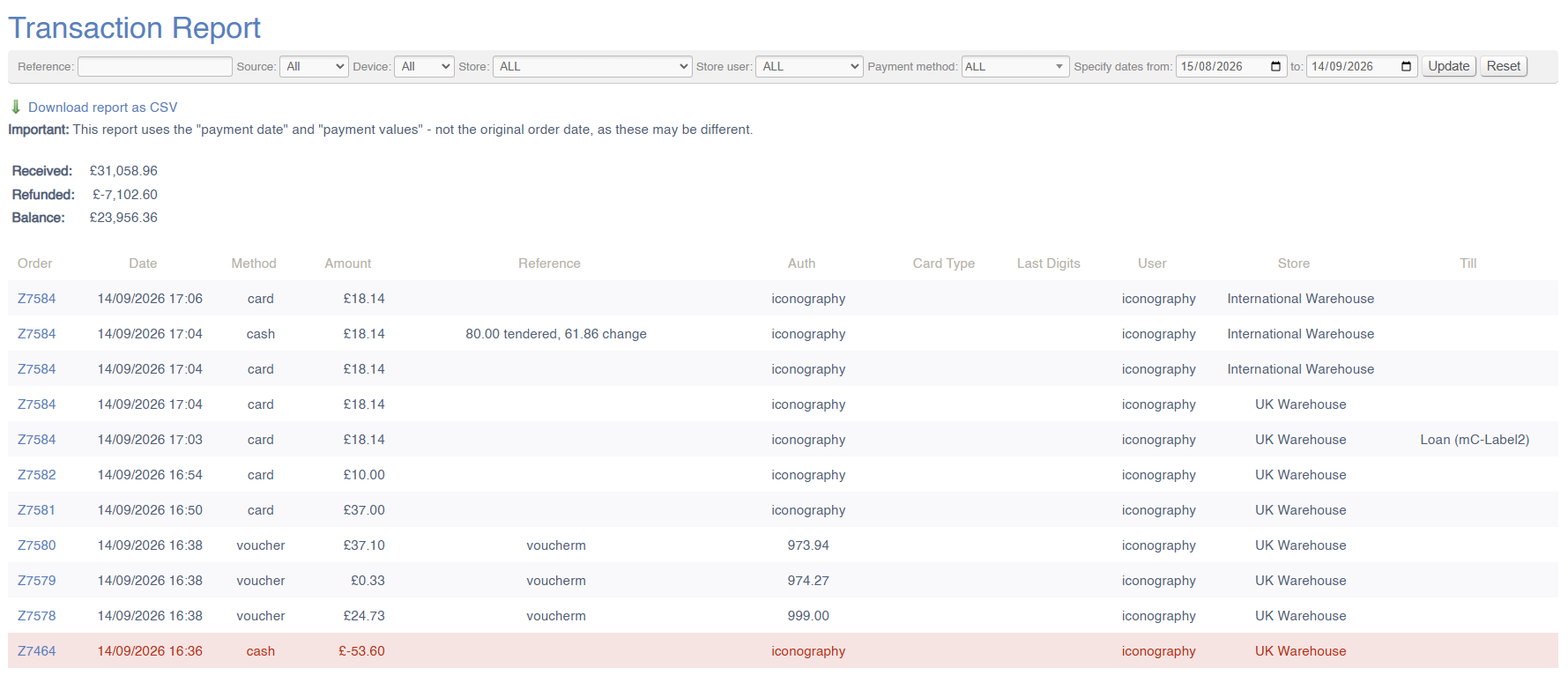](https://bookstack.iconography.co.uk/uploads/images/gallery/2026-09/KJwimage.png) #### Filters This report may be filtered by: - Payment Reference - Source - Device - Store - Store User - Payment Method - Date Range #### Key to icons  = download report ### FAQs FAQs for Payment Reports may be viewed [here](https://bookstack.iconography.co.uk/books/payment-reports/page/faqs "FAQs"). # Refunds This report will show a breakdown of company-wide refunds within a given period. It will also list the item(s) returned/cancelled, as well as a return reason, if one has been logged. 'Time Elapsed' records how much time has passed between the item being added to an order, and it being cancelled/returned.'Payment Date' for pending payment (e.g. finance orders) will be taken as the date that the payment was completed
[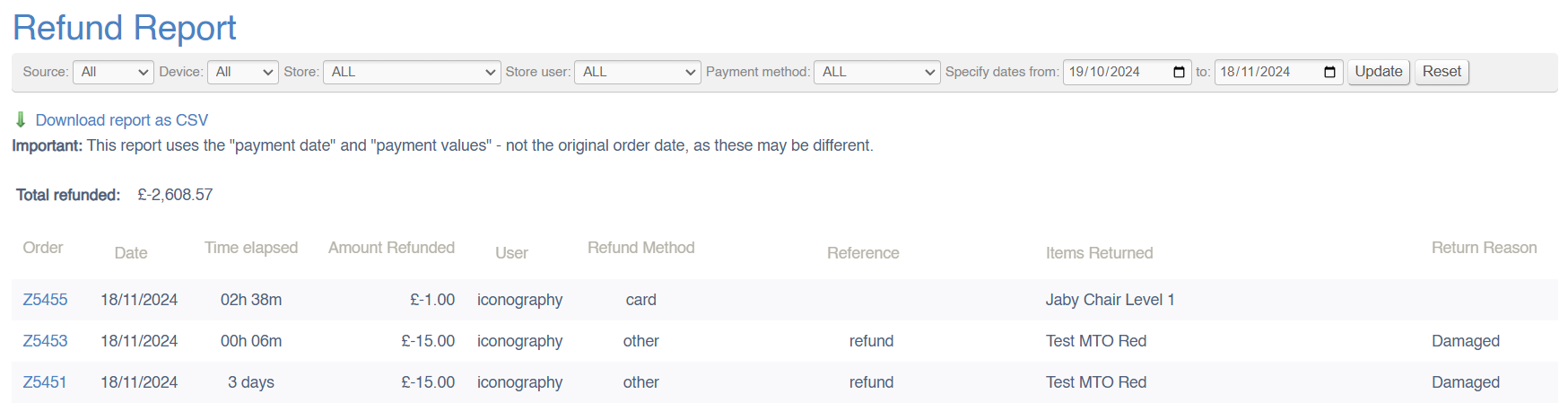](https://bookstack.iconography.co.uk/uploads/images/gallery/2024-11/V3Bimage.png) #### Filters This report may be filtered by: - Payment Reference - Source - Device - Store - Store User - Payment Method - Date Range #### Key to icons  = download report ### FAQs FAQs for Payment Reports may be viewed [here](https://bookstack.iconography.co.uk/books/payment-reports/page/faqs "FAQs"). # Discounts This report will show a breakdown of company-wide discounts within a given period. Each discount will be listed individually, showing promotion code/discount reasons as appropriate. To view the performance of individual campaigns, please view the [Promotion Usage](https://bookstack.iconography.co.uk/books/customer-reports/page/promotion-usage "Promotion Usage") report. [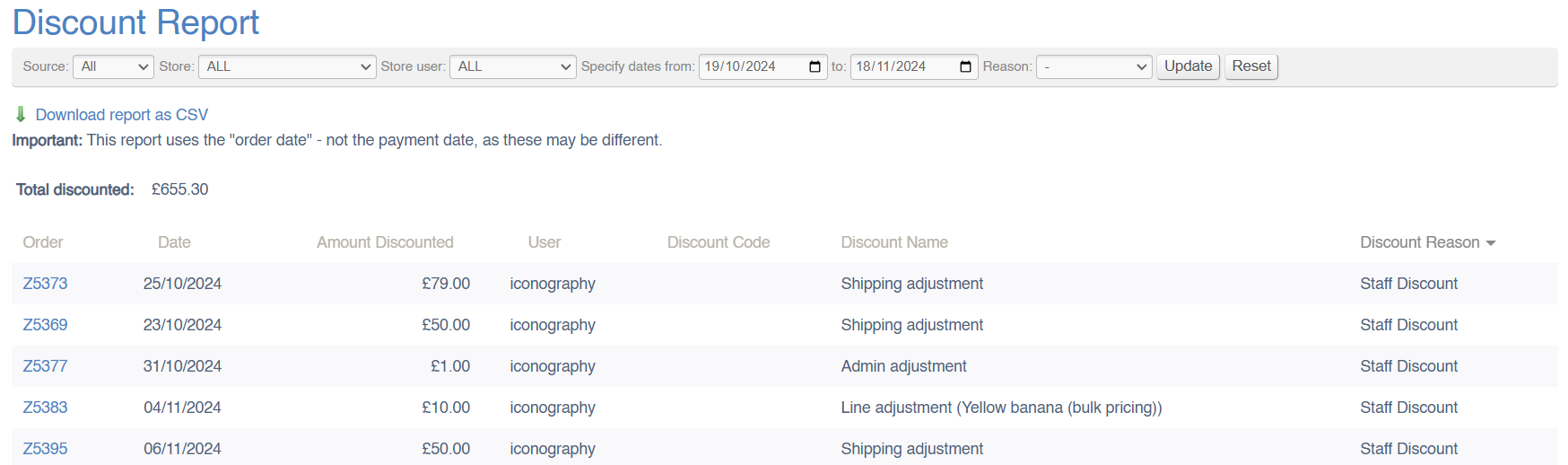](https://bookstack.iconography.co.uk/uploads/images/gallery/2024-11/s8Aimage.png) #### Filters This report may be filtered by: - Payment Reference - Source - Store - Store User - Date Range - Refund Reason #### Key to icons  = download report ### FAQs FAQs for Payment Reports may be viewed [here](https://bookstack.iconography.co.uk/books/payment-reports/page/faqs "FAQs"). # Exports by Country This report will provide a summary of items delivered to any specific country, along with a breakdown of VATable elements, e.g. goods and shipping. [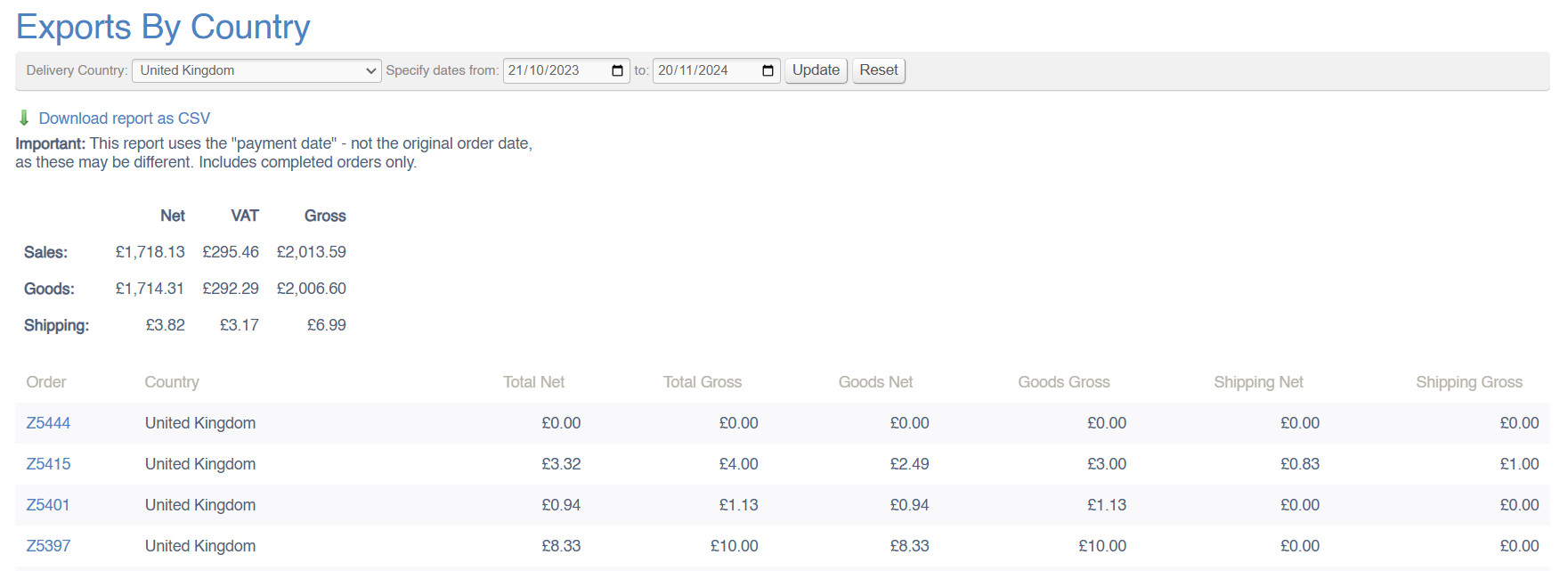](https://bookstack.iconography.co.uk/uploads/images/gallery/2024-11/Itwimage.png) #### Filters This report may be filtered by: - Country - Date Range #### Key to icons  = download report ### FAQs FAQs for Payment Reports may be viewed [here](https://bookstack.iconography.co.uk/books/payment-reports/page/faqs "FAQs"). # Till Discrepancies This report will show any discrepancies which occur during the [End of Day](https://bookstack.iconography.co.uk/books/epos/page/end-of-day "End of Day") process. An entry is recorded against each Store for each date that they fulfil the process. This is then viewable retrospectively over any time period. > Automated payment types (e.g. from integrated payment methods) will not be displayed here, as they are automatically balanced. [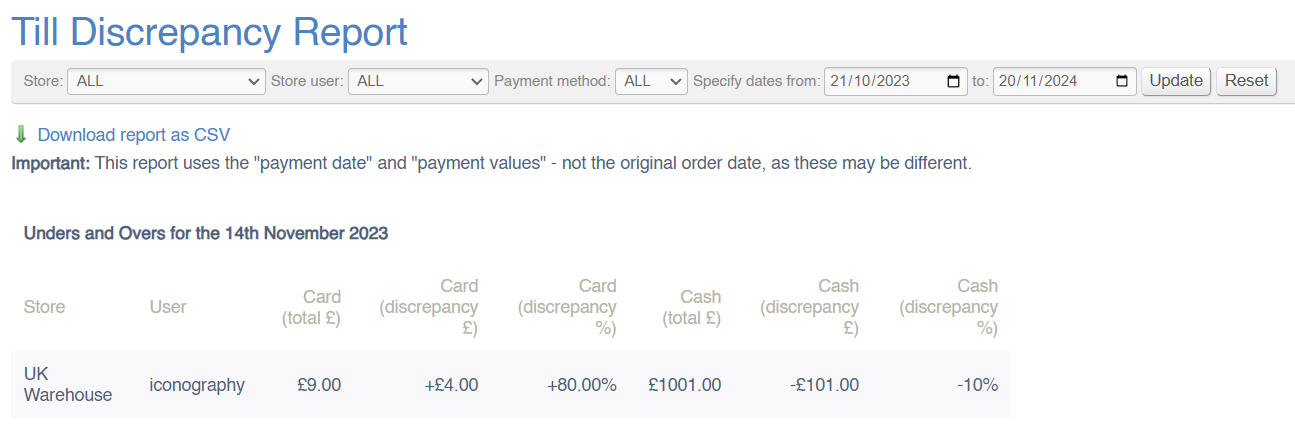](https://bookstack.iconography.co.uk/uploads/images/gallery/2024-11/89Vimage.png) #### Filters This report may be filtered by: - Date Range - Store - Store User - Payment Method #### Key to icons  = download report ### FAQs FAQs for Payment Reports may be viewed [here](https://bookstack.iconography.co.uk/books/payment-reports/page/faqs "FAQs").