Dropship Purchase Orders (Direct Home Delivery)
A dropship Purchase Order (also known as Direct Home Delivery) is a Purchase Order where the Supplier will deliver directly to the Customer.
For Dropship to be available on a Sales Order, the following prerequisites must be met:
- there must be a delivery address
- the Supplier must be enabled for dropshipping
How it works
Sales Order Management
The Sales order management process is shortened due to the dropship process. It will go through two stages:
- Purchase Order created - the Sales Order will be set to 'On Order'
- Purchase Order acknowledged - the Sales Order will be set to 'Completed'
Stock Allocation
Once a Sales Order Line has been allocated to a dropship Purchase Order, it can not be unallocated. If this is required, the Purchase Order must first be cancelled. Once this is done, the Sales Order Line can be allocated as normal.
Delivery
Delivery Store
This will be hard coded to 'dropship/other'
If a customer changes their mind, and requests alternate delivery, the Purchase Order will need to be cancelled and reordered - it can not be changed
Delivery Charge
This will be set by the dropship carriage charge set against the Supplier.
Delivery Address
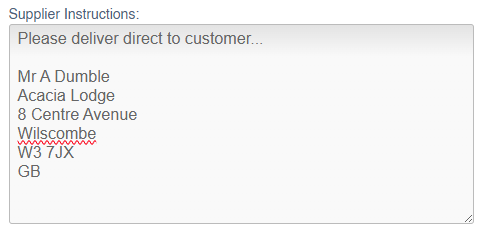
When submitting a Purchase Order, the Customer address will be automatically output in the Supplier Instructions:
It is not possible to use the Scheduler to assign a Lorry Journey to a Sales Order with a dropship Purchase Order
Purchase Order Management
It is not possible to receive a dropship Purchase Order in the normal manner. Instead, once it is acknowledged, the user can only mark the Purchase Order as Invoiced, and then as completed.