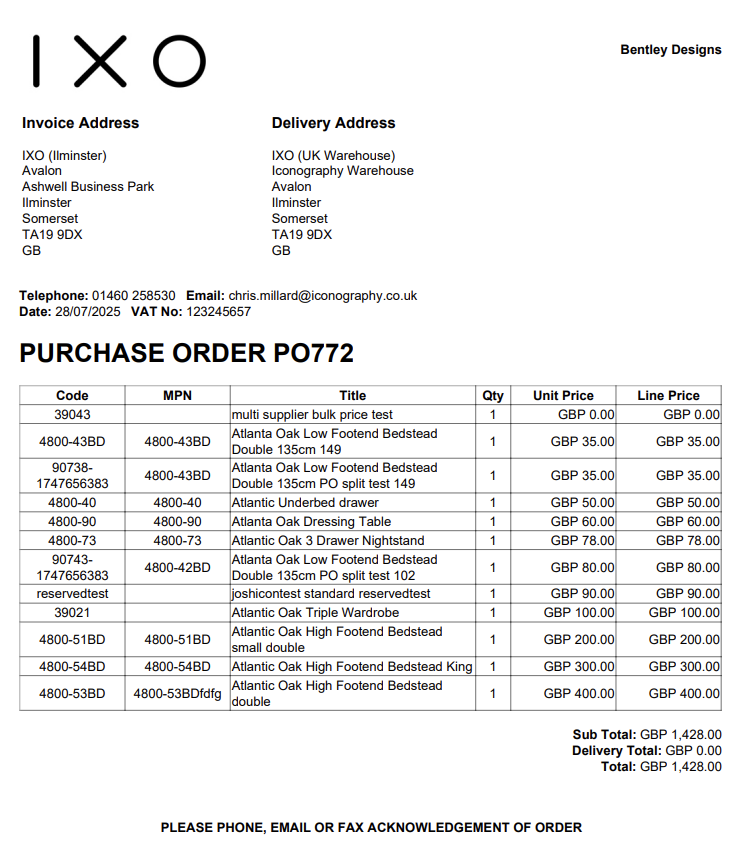
The 'title' field will pull from the 'Manufacturer's Product Name' field, if one has been entered against the Product.
[](https://bookstack.iconography.co.uk/uploads/images/gallery/2025-10/rhYimage.png) ### Print Product Labels This will print Product Labels for items on the Purchase Order. It is possible to print labels with or without prices.If a Purchase Order has not yet received any stock, this will print labels for all Purchase Order Lines using logic available [here](https://bookstack.iconography.co.uk/books/general/page/label-printing)
If a Purchase Order has received stock, an option is given to print all, or just received lines using logic available [here](https://bookstack.iconography.co.uk/books/general/page/label-printing)
### Print Warehouse Labels This will print Warehouse Labels for items on the Purchase Order.If a Purchase Order has not yet received any stock, this will print labels for all Purchase Order Lines using logic available [here](https://bookstack.iconography.co.uk/books/general/page/label-printing)
If a Purchase Order has received stock, an option is given to print all, or just received lines using logic available [here](https://bookstack.iconography.co.uk/books/general/page/label-printing)