# Order Products

[![image.png](https://bookstack.iconography.co.uk/uploads/images/gallery/2025-08/scaled-1680-/D70image.png)](https://bookstack.iconography.co.uk/uploads/images/gallery/2025-08/D70image.png)

This section will show a list of Order Products, which are separated into individual Sales Order Lines.

### Product Types

Different products will display differently, with different information.

#### Standard Products

These are products without [Customisations](https://bookstack.iconography.co.uk/books/categories/page/customisation "Customisation").

[![image.png](https://bookstack.iconography.co.uk/uploads/images/gallery/2025-08/scaled-1680-/Iujimage.png)](https://bookstack.iconography.co.uk/uploads/images/gallery/2025-08/Iujimage.png)

<table border="1" id="bkmrk-field-purpose-code-t" style="border-collapse: collapse; width: 100%;"><colgroup><col style="width: 49.9392%;"></col><col style="width: 49.9392%;"></col></colgroup><thead><tr><td>Field</td><td>Purpose</td></tr></thead><tbody><tr><td>Code</td><td>*This is the SKU code of the Variant purchased*</td></tr><tr><td>Name</td><td>*This is the name of the Product purchased*</td></tr><tr><td>Unit Price</td><td>*This is the price of the Product purchased*

<p class="callout info">*This will show additional detail if order level discounts have been applied, but not if a special offer price is active on the Variant sold*</p>

</td></tr><tr><td>Quantity</td><td>*The quantity of the Variant purchased by the Customer*</td></tr></tbody></table>

#### Made to Order Products

These are products with [Customisations](https://bookstack.iconography.co.uk/books/categories/page/customisation "Customisation").

[![image.png](https://bookstack.iconography.co.uk/uploads/images/gallery/2025-08/scaled-1680-/U36image.png)](https://bookstack.iconography.co.uk/uploads/images/gallery/2025-08/U36image.png)

<table border="1" id="bkmrk-field-purpose-code-t-1" style="border-collapse: collapse; width: 100%;"><colgroup><col style="width: 49.9392%;"></col><col style="width: 49.9392%;"></col></colgroup><thead><tr><td>Field</td><td>Purpose</td></tr></thead><tbody><tr><td>Code</td><td>*This is the SKU code of the Variant purchased*</td></tr><tr><td>Name</td><td>*This is the name of the Product purchased*

*Customisations selected by the Customer are detailed below; these are shown in alphabetical order with additional custom options appended below the ones applied on the [Customisation ](https://bookstack.iconography.co.uk/books/categories/page/customisation "Customisation")tab*

</td></tr><tr><td>Unit Price</td><td>*This is the price of the Product purchased*

<p class="callout info">*This will show additional detail if order level discounts have been applied, but not if a special offer price is active on the Variant sold*</p>

</td></tr><tr><td>Quantity</td><td>*The quantity of the Variant purchased by the Customer*</td></tr></tbody></table>

#### Bundle

These are products set up as [Bundles](https://bookstack.iconography.co.uk/books/categories/page/bundle "Bundle").

[![image.png](https://bookstack.iconography.co.uk/uploads/images/gallery/2025-08/scaled-1680-/kCWimage.png)](https://bookstack.iconography.co.uk/uploads/images/gallery/2025-08/kCWimage.png)

<p class="callout info">The contents of a Bundle are displayed below the parent Bundle product; for these, the price and quantity will be greyed out and locked. The prices are for reporting purposes only, designed to show an indicative value assigned to the Bundle components. The quantities are used for fulfilment and stock reservation, as each component may be [processed ](https://bookstack.iconography.co.uk/books/sales-orders/page/process-order-lines "Process Order Lines")individually.</p>

<table border="1" id="bkmrk-field-purpose-code-t-2" style="border-collapse: collapse; width: 100%;"><colgroup><col style="width: 49.9392%;"></col><col style="width: 49.9392%;"></col></colgroup><thead><tr><td>Field</td><td>Purpose</td></tr></thead><tbody><tr><td>Code</td><td>*This is the SKU code of the Variant purchased*</td></tr><tr><td>Name</td><td>*This is the name of the Product purchased*</td></tr><tr><td>Unit Price</td><td>*This is the price of the Product purchased*

<p class="callout info">*This will show additional detail if order level discounts have been applied, but not if a special offer price is active on the Variant sold*</p>

</td></tr><tr><td>Quantity</td><td>*The quantity of the Variant purchased by the Customer*</td></tr></tbody></table>

#### Addons

These are shown below linked Sales Order Lines.

[![image.png](https://bookstack.iconography.co.uk/uploads/images/gallery/2025-08/scaled-1680-/d3nimage.png)](https://bookstack.iconography.co.uk/uploads/images/gallery/2025-08/d3nimage.png)

<p class="callout info">Addons will be displayed on linked items, as well as on their own line; this is to clearly show which Sales Order Lines are linked to which Addons.</p>

<table border="1" id="bkmrk-field-purpose-code-t-3" style="border-collapse: collapse; width: 100%;"><colgroup><col style="width: 49.9392%;"></col><col style="width: 49.9392%;"></col></colgroup><thead><tr><td>Field</td><td>Purpose</td></tr></thead><tbody><tr><td>Code</td><td>*This is the SKU code of the Addonpurchased*</td></tr><tr><td>Name</td><td>*This is the name of the Addon purchased*</td></tr><tr><td>Unit Price</td><td>*This is the price of the Addon purchased*

<p class="callout info">*This will show additional detail if order level discounts have been applied, but not if a special offer price is active on the Variant sold*</p>

</td></tr><tr><td>Quantity</td><td>*The quantity of the Addon will always be '1'*</td></tr></tbody></table>

#### Voucher

[![image.png](https://bookstack.iconography.co.uk/uploads/images/gallery/2025-08/scaled-1680-/t3Uimage.png)](https://bookstack.iconography.co.uk/uploads/images/gallery/2025-08/t3Uimage.png)

<p class="callout warning">Vouchers are automatically despatched when the order is paid in full.</p>

<table border="1" id="bkmrk-field-purpose-code-t-4" style="border-collapse: collapse; width: 100%;"><colgroup><col style="width: 49.9392%;"></col><col style="width: 49.9392%;"></col></colgroup><thead><tr><td>Field</td><td>Purpose</td></tr></thead><tbody><tr><td>Code</td><td>*This is the SKU code of the Variant purchased*</td></tr><tr><td>Name</td><td>*This is the name of the Product purchased*</td></tr><tr><td>Unit Price</td><td>*This is the price of the Voucher, either as per the Variant selected, or as per a customer amount for this Sales Order*

*Additional information will also show on the Sales Order Line:*

- *date sent*
- *recipient email address*
- *voucher code*
- *balance remaining*

</td></tr><tr><td>Quantity</td><td>*The quantity of the Variant purchased by the Customer*</td></tr></tbody></table>

#### Booking

[![image.png](https://bookstack.iconography.co.uk/uploads/images/gallery/2025-08/scaled-1680-/uBPimage.png)](https://bookstack.iconography.co.uk/uploads/images/gallery/2025-08/uBPimage.png)

<table border="1" id="bkmrk-field-purpose-code-t-5" style="border-collapse: collapse; width: 100%;"><colgroup><col style="width: 49.9392%;"></col><col style="width: 49.9392%;"></col></colgroup><thead><tr><td>Field</td><td>Purpose</td></tr></thead><tbody><tr><td>Code</td><td>*This is the SKU code of the Variant purchased*</td></tr><tr><td>Name</td><td>*This is the name of the Product purchased*</td></tr><tr><td>Unit Price</td><td>*This is the price of the Variant purchased*

*Additional information will also show on the Sales Order Line:*

- *date of booking*
- *time of booking*

<p class="callout info">*This will show additional detail if order level discounts have been applied, but not if a special offer price is active on the Variant sold*</p>

</td></tr><tr><td>Quantity</td><td>*The quantity of the Variant purchased by the Customer*</td></tr></tbody></table>

### Other Actions

#### Adding a new line item

You can either search for an existing product or add a custom product to a Sales Order

##### Existing Product

Search for an existing Product by Name or by Code; you will then be able to make your selection from a list.

[![image.png](https://bookstack.iconography.co.uk/uploads/images/gallery/2025-08/scaled-1680-/Ppnimage.png)](https://bookstack.iconography.co.uk/uploads/images/gallery/2025-08/Ppnimage.png)

Unavailable Unique Stock Records will be displayed greyed out, with a strikethrough. This is to assist reordering.

##### Custom Product

Simply enter a custom SKU Code which doesn't match anything within your product database. Then add a name and price as required.

#### Changing quantity ordered

It is only possible to amend the quantity on a Sales Order Line on the day that it was added to the Sales Order. This is to preserve the integrity of reporting.

#### Removing VAT

Use the tick box to remove VAT from a product.

<p class="callout info">A [VAT Exemption Form](https://bookstack.iconography.co.uk/books/general/page/vat-exemption-form "VAT Exemption Form") may be added from the [Quick Access Buttons](https://bookstack.iconography.co.uk/books/sales-orders/page/quick-access-buttons "Quick Access Buttons")</p>

#### Delete Cancelled Lines

Pressing this button will remove cancelled lines from the Sales Order and all associated paperwork.

These Sales Order Lines are not deleted from the system, and are retained for reporting purposes.

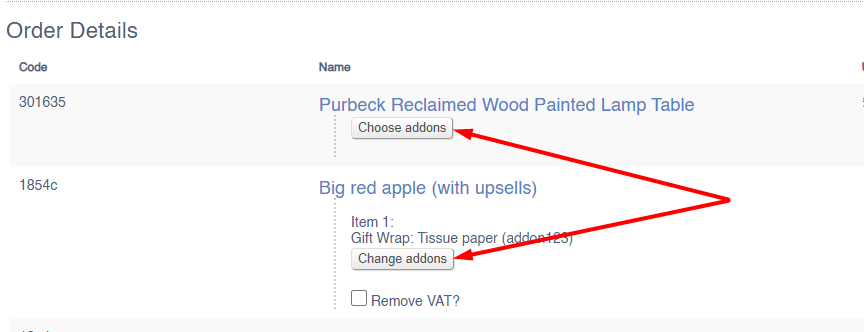
#### Change/Choose Addons

Use this button to change/choose Addons.

[![image.png](https://bookstack.iconography.co.uk/uploads/images/gallery/2025-10/scaled-1680-/YKQimage.png)](https://bookstack.iconography.co.uk/uploads/images/gallery/2025-10/YKQimage.png)
#### Create RMA

Use this option to create an [RMA](https://bookstack.iconography.co.uk/books/returns-aka-rmas) (return merchandise authorisation) to formally process a return.