# Sold Items
A report listing items that have been sold, with a call to action on each row that opens the full list of sales orders containing that SKU. The report is intended for situations where every order containing a given item needs to be identified quickly, such as a factory recall.
This is a report for Variants, not USRs; they will be included within the figures for the linked Variant
This reported is based on Sales Order and Sales Order Line data.
| Scenario |
|
| Items Sold | *Apply 'date type' filter for 'Ordered'*
*This shows Products sold based on Sales Order Date*
|
| Items Delivered | *Apply 'date type' filter for 'Delivered'*
*This shows Products delivered based on Sales Order Line despatch date*
|
| Items Returned | *Apply 'date type' filter for 'Returned'*
*This shows Products based on Sales Order Line returned date*
|
[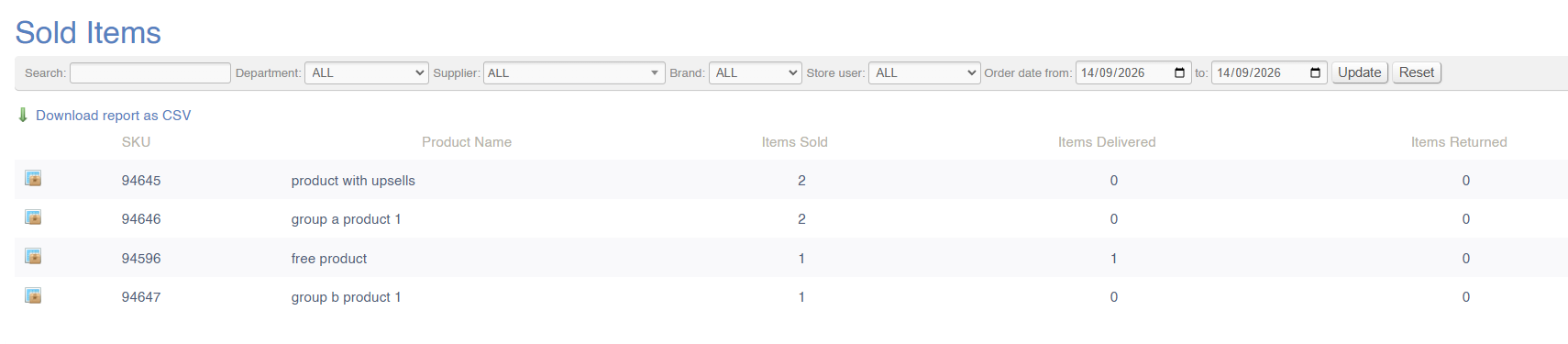](https://bookstack.iconography.co.uk/uploads/images/gallery/2026-09/oLCimage.png)
#### Filters
This report can be filtered by:
- Order date
- SKU or product name
- Salesperson
- Department
- Supplier
- Brand
#### Key to icons
[](https://bookstack.iconography.co.uk/uploads/images/gallery/2026-09/85Dimage.png) = view associated Sales Orders
### FAQs
FAQs for Sales Reports may be viewed [here](https://bookstack.iconography.co.uk/books/sales-reports/page/faqs "FAQs").