# Stock Reports
# FAQs
## Real Time Data
### Are the reports up to date?
All reports show a snapshot of data at the instant that they were generated. As such, they are always up to date.
## General
### Are Reports sortable?
All reports are sortable - simply click on the headers.
### Can a report be exported?
All reports are exportable as a CSV.
### Why are some results 'N/A' or simply blank?
This will be due to missing information, e.g. products that are sold which have not been assigned to a Department, or to a Brand with a blank entry in the name.
# Low Stock
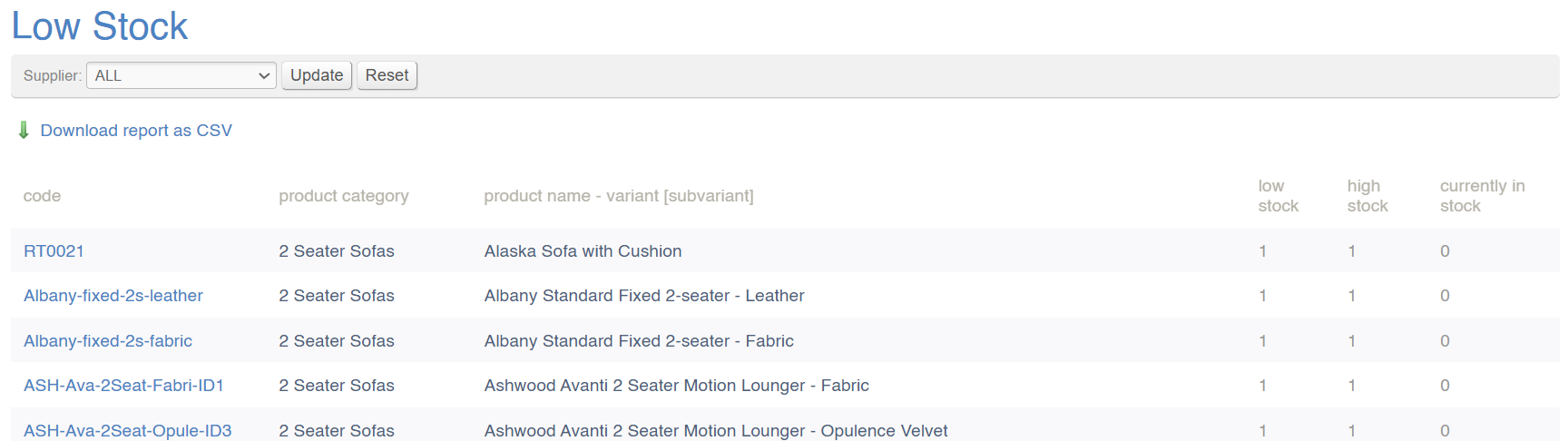
This screen lists anything that is out of stock or is below the minimum threshold set for that product.
> To set a low stock threshold, edit the Product in the [Inventory](https://bookstack.iconography.co.uk/books/categories/page/inventory "Inventory") tab
[](https://bookstack.iconography.co.uk/uploads/images/gallery/2024-11/eOWimage.png)
#### Filters
This report may be filtered by:
- Supplier
#### Key to icons
 = download report
### FAQs
FAQs for Stock Reports may be viewed [here](https://bookstack.iconography.co.uk/books/stock-reports/page/faqs "FAQs").
# Stock Notify
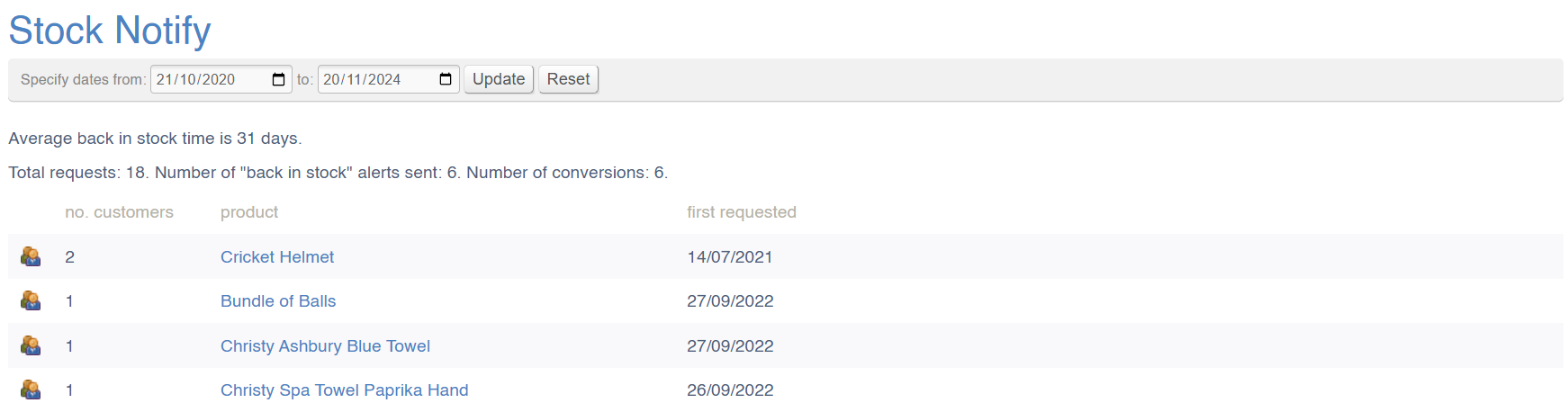
This report shows all Products about which customers have asked to be notified about when they come back in stock.
> Customers will be emailed automatically when stock is added to these products.
It is also possible to view the individual customers who have been notified about each product; conversions are logged and reported on here.
[](https://bookstack.iconography.co.uk/uploads/images/gallery/2024-11/AtAimage.png)
#### Filters
This report may be filtered by:
- Date of request for 'back in stock notification'
#### Key to icons
 = download report
[](https://bookstack.iconography.co.uk/uploads/images/gallery/2024-11/qGlimage.png) = view customers who have been sent a back in stock notification for this product
### FAQs
FAQs for Stock Reports may be viewed [here](https://bookstack.iconography.co.uk/books/stock-reports/page/faqs "FAQs").
# Stock History
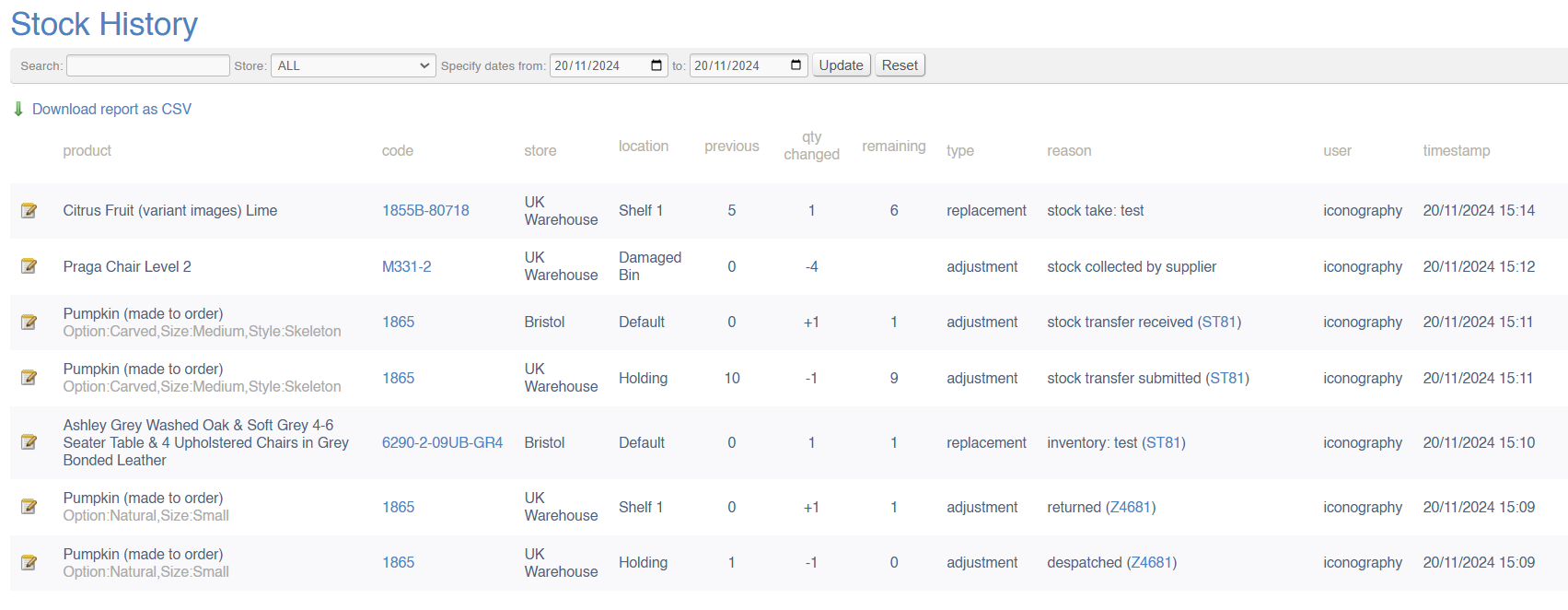
This report shows all stock adjustments via the system for a particular date range.
It will show all stock amendments within a given period, which user amended the stock and when.
[](https://bookstack.iconography.co.uk/uploads/images/gallery/2024-11/7Gvimage.png)
#### Adjustment or Replacement
All records are listed as one of these two:
- Adjustment - Stock has been amended by the action, e.g. '2 despatched to Customer' or '5 received at Goods In'
- Replacement - where a new figure has replaced an old one, e.g. 'manual adjustment' or 'stock take'
#### Reason
This provide a list of reasons, and one will be ascribed to each record in the report:
- Purchase Order received (with a link to the Purchase Order)
- Sales Order despatched (with a link to the Sales Order)
- Inventory Tab (Manual Adjustment)
- Stock Transfer (despatched or received with a link to the Stock Transfer)
- Stock Take
- Return to Supplier
- Return (with a link to the Sales Order)
- Auto-corrected for despatched {Sales Order Number} (this will show if an item is despatched without stock)
If a User has recorded a note, that will also be shown in the reason column
#### Filters
This report may be filtered by:
- Search (for a SKU)
- Store
- Date Range
#### Key to icons
 = download report
### FAQs
FAQs for Stock Reports may be viewed [here](https://bookstack.iconography.co.uk/books/stock-reports/page/faqs "FAQs").
# Stock Discrepancy
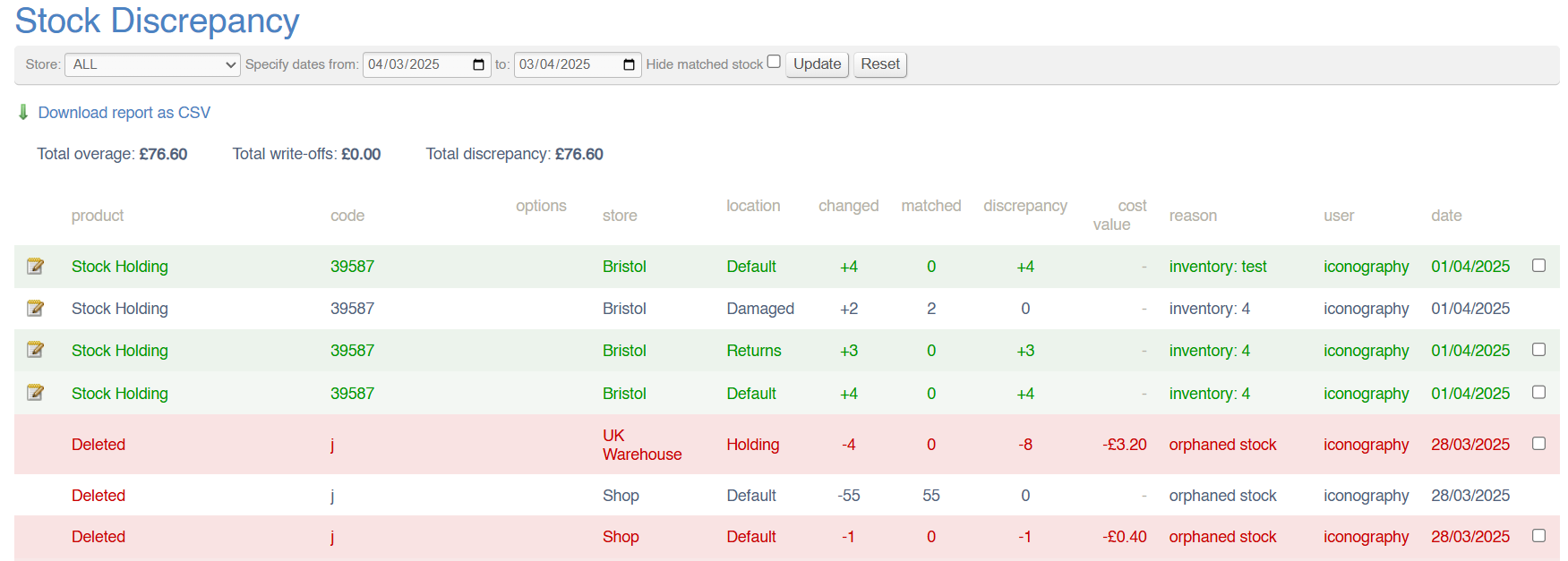
This report provides you with a list of all stock discrepancies over time, both as a value (based on cost price) and stock quantity. These overages and write-offs are based on Stock Takes and manual inventory alterations.
The report provides a headline value of both overage and write offs. These are based on unexplained Stock Discrepancies; automated [Stock Matching](https://bookstack.iconography.co.uk/books/general/page/orphan-stock-and-stock-matching "Stock Matching and Orphan Stock") will automatically resolve Stock Discrepancies where possible.
It is possible to manually mark Stock Discrepancies as resolved from this screen by using the tick boxes on the right hand side; doing so will not remove the record, but will exclude it from the totals at the top of the report.
[](https://bookstack.iconography.co.uk/uploads/images/gallery/2025-04/UYbimage.png)
#### Colour Coding
Overages are marked in green.
Write offs are marked in red.
Resolved Stock Discrepancies are not highlighted, and are shown in white.
#### Filters
This report may be filtered by:
- Store
- Date Range
#### Key to icons
 = download report
### FAQs
FAQs for Stock Reports may be viewed [here](https://bookstack.iconography.co.uk/books/stock-reports/page/faqs "FAQs").
# Stock Holding
This report can be used to give you a full valuation of stock held at a specific location. Select your Store and Stock Location at the top of the screen.
This gives a breakdown by Variant, and will not detail the Unique Stock Items, e.g. you have five Example Sofas in the same location; the report will not detail that one is red, one is blue and three are green.
Totals will display below the report for each column; these totals are the total value (based on cost price) of each unit in that column.
[](https://bookstack.iconography.co.uk/uploads/images/gallery/2025-09/image.png)
#### Filters
This report may be filtered by:
- Store/Location
- Supplier
#### Key to icons
 = download report
### FAQs
FAQs for Stock Reports may be viewed [here](https://bookstack.iconography.co.uk/books/stock-reports/page/faqs "FAQs").
# Aged Stock
This report shows individual stock records, their cost price and the date they were added to the system.
It can also be used to view the individual unit prices of each unit of stock in the database.
> This gives a breakdown by Variant, and will not detail the Unique Stock Items, e.g. you have five 'Example Sofas' in the same location; the report will not detail that one is red, one is blue and three are green.
[](https://bookstack.iconography.co.uk/uploads/images/gallery/2024-11/LvEimage.png)
#### Filters
This report may be filtered by:
- Search (for a SKU/product name)
- Store
- Date Range (date stock was added to the database)
#### Key to icons
 = download report
### FAQs
FAQs for Stock Reports may be viewed [here](https://bookstack.iconography.co.uk/books/stock-reports/page/faqs "FAQs").
# Logistics
This report shows a calendar view of goods coming in and out of your Store(s). This will include:
- Purchase Orders coming into a Store
- Stock Transfers coming into a Store
- Stock Transfers leaving a Store
- Supplier Returns being collected from a Store
It also displays a breakdown of precisely which products are expected in via a Purchase Order.
[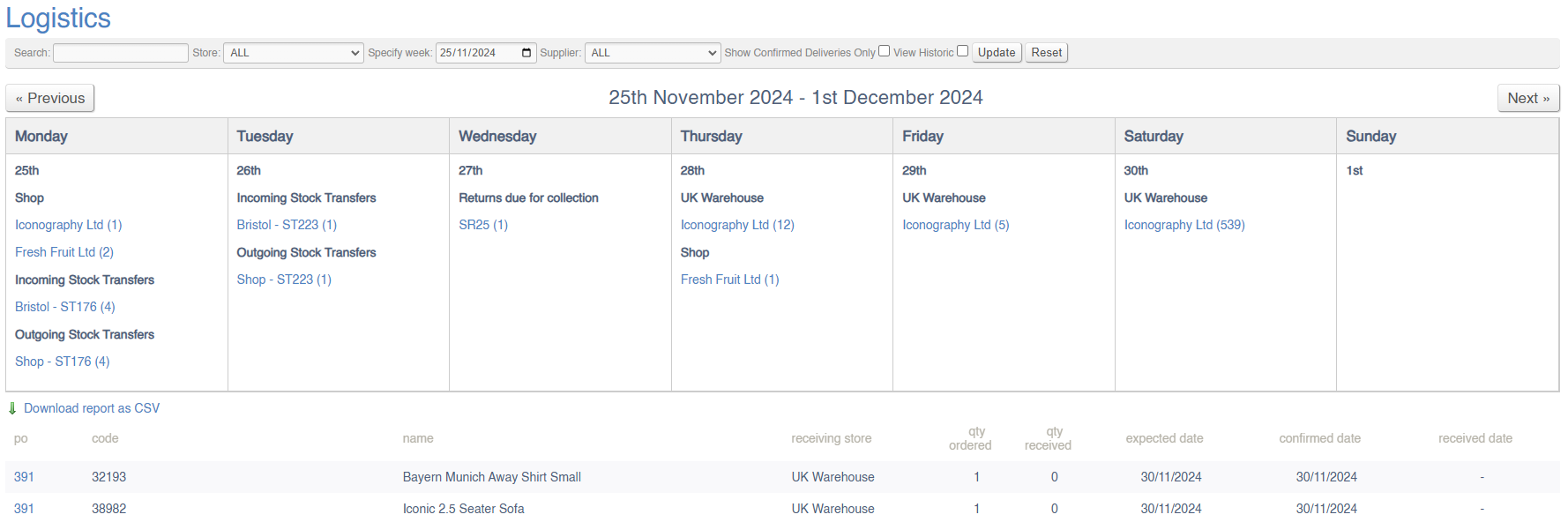](https://bookstack.iconography.co.uk/uploads/images/gallery/2024-11/JGWimage.png)
#### Filters
This report may be filtered by:
- Product Search (limits the secondary report to that particular SKU)
- Purchase Order/Stock Transfer/
- Store
- Supplier
- Show Confirmed Deliveries Only (this will affect which Purchase Orders are shown)
- View Historic
#### Key to icons
 = download product report
### FAQs
FAQs for Stock Reports may be viewed [here](https://bookstack.iconography.co.uk/books/stock-reports/page/faqs "FAQs").