# Stock Take via Barcode Scanner

An in browser stock take should be managed either via a [manual count](https://bookstack.iconography.co.uk/books/stock-take/page/stock-take-in-browser "Stock Take in Browser"), or through barcode scanning. Regardless of these choices, the process is very similar.

<p class="callout info">A full history of Stock Takes will be found within the [Stock History](https://bookstack.iconography.co.uk/books/stock-reports/page/stock-history "Stock History") report. </p>

<p class="callout info">There is a separate record of [Stock Discrepancies](https://bookstack.iconography.co.uk/books/stock-reports/page/stock-discrepancy "Stock Discrepancy").</p>

### Choose your Store and Location

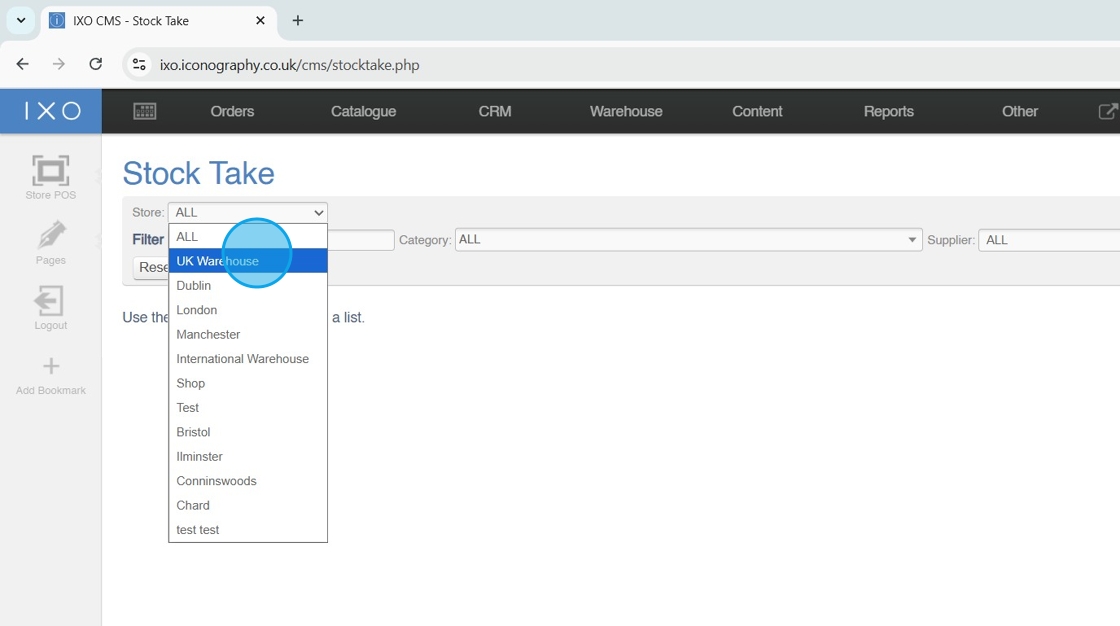
1\. Choose the Store to Stock Take
![](https://ajeuwbhvhr.cloudimg.io/https://colony-recorder.s3.amazonaws.com/files/2025-10-27/19783907-44d0-48d9-9417-8ea5fcf79821/ascreenshot.jpeg?tl_px=0,0&br_px=1376,769&force_format=jpeg&q=100&width=1120.0&wat=1&wat_opacity=1&wat_gravity=northwest&wat_url=https://colony-recorder.s3.amazonaws.com/images/watermarks/0EA5E9_standard.png&wat_pad=221,217)

Tip: Filtering by Store is mandatory, filtering by Location is optional

2\. Choose the Location to Stock Take

![](https://ajeuwbhvhr.cloudimg.io/https://colony-recorder.s3.amazonaws.com/files/2025-10-27/8cc3b458-9f43-4c93-b66d-8ad4f39caedd/ascreenshot.jpeg?tl_px=0,142&br_px=1376,911&force_format=jpeg&q=100&width=1120.0&wat=1&wat_opacity=1&wat_gravity=northwest&wat_url=https://colony-recorder.s3.amazonaws.com/images/watermarks/0EA5E9_standard.png&wat_pad=484,277)

### Apply Other Filters

Tip: You can apply further filters to complete a Stock Take for a specific Category, Supplier, Brand or Collection

Alternatively, search for a specific Product to Stock Take

3\. Apply your filters

![](https://ajeuwbhvhr.cloudimg.io/https://colony-recorder.s3.amazonaws.com/files/2025-10-27/9fc1627c-8207-410b-80b9-a148f1f4cdd0/ascreenshot.jpeg?tl_px=544,272&br_px=1920,1041&force_format=jpeg&q=100&width=1120.0&wat=1&wat_opacity=1&wat_gravity=northwest&wat_url=https://colony-recorder.s3.amazonaws.com/images/watermarks/0EA5E9_standard.png&wat_pad=629,276)

### Define Blank Values

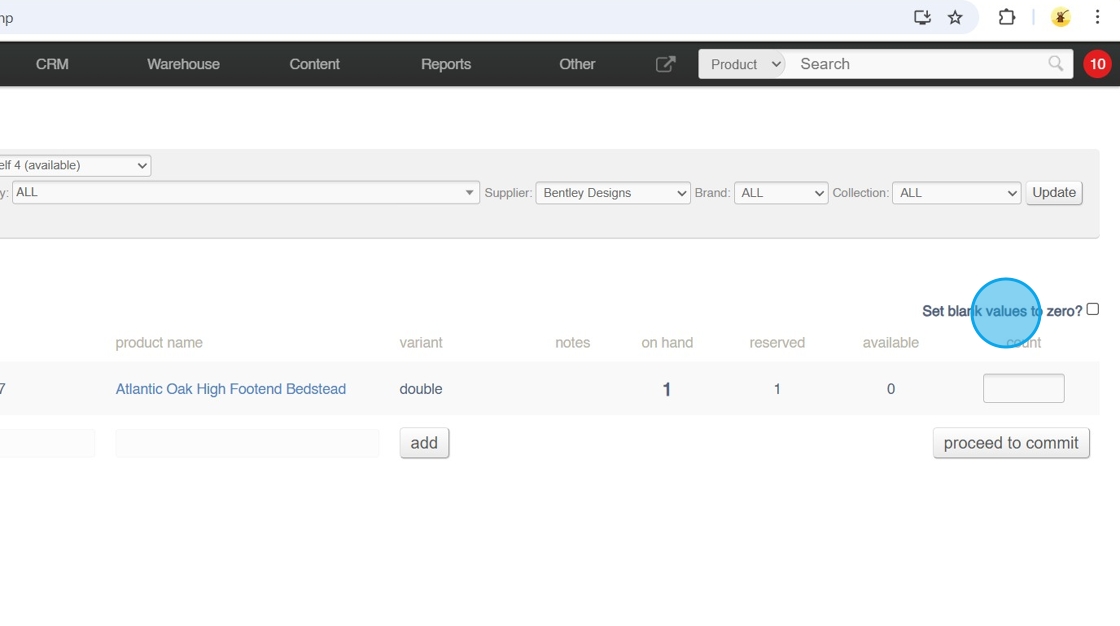
Tip: Setting blank values to zero will wipe any stock that is not counted; toggling this will force the user to do a full stock take

It blank values are left blank, products which do not have a count entered will by left untouched, and will not be updated by the stock take

4\. Click to toggle 'set blank values to zero'
![](https://ajeuwbhvhr.cloudimg.io/https://colony-recorder.s3.amazonaws.com/files/2025-10-27/512472a7-76d3-4291-b5ef-a659acbe7641/ascreenshot.jpeg?tl_px=544,58&br_px=1920,827&force_format=jpeg&q=100&width=1120.0&wat=1&wat_opacity=1&wat_gravity=northwest&wat_url=https://colony-recorder.s3.amazonaws.com/images/watermarks/0EA5E9_standard.png&wat_pad=970,277)

### Complete the Count

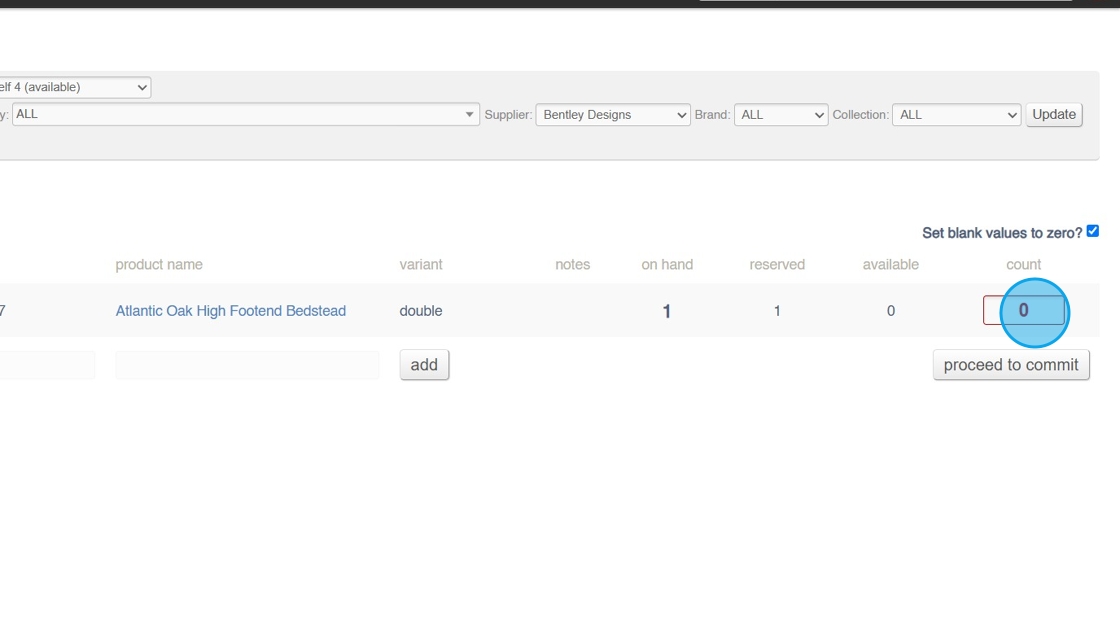
5\. Scan barcodes to make the count; each scanned barcode will increase the quantity by one
![](https://ajeuwbhvhr.cloudimg.io/https://colony-recorder.s3.amazonaws.com/files/2025-10-27/93884556-5225-4346-a8a3-db2937548ba8/ascreenshot.jpeg?tl_px=544,154&br_px=1920,923&force_format=jpeg&q=100&width=1120.0&wat=1&wat_opacity=1&wat_gravity=northwest&wat_url=https://colony-recorder.s3.amazonaws.com/images/watermarks/0EA5E9_standard.png&wat_pad=999,277)

6\. If you have found unexpected items, scan them; this will automatically add a new line

7\. Commit the count

![](https://ajeuwbhvhr.cloudimg.io/https://colony-recorder.s3.amazonaws.com/files/2025-10-27/21fd927a-52b5-41d7-b0f6-56ff75a48e06/ascreenshot.jpeg?tl_px=544,281&br_px=1920,1050&force_format=jpeg&q=100&width=1120.0&wat=1&wat_opacity=1&wat_gravity=northwest&wat_url=https://colony-recorder.s3.amazonaws.com/images/watermarks/0EA5E9_standard.png&wat_pad=987,277)

8\. Add reasons for adjustments at this stage

![](https://ajeuwbhvhr.cloudimg.io/https://colony-recorder.s3.amazonaws.com/files/2025-10-27/23f008e2-a95a-47c4-b96d-c3f424e71c98/ascreenshot.jpeg?tl_px=544,45&br_px=1920,814&force_format=jpeg&q=100&width=1120.0&wat=1&wat_opacity=1&wat_gravity=northwest&wat_url=https://colony-recorder.s3.amazonaws.com/images/watermarks/0EA5E9_standard.png&wat_pad=920,277)

9\. Click "commit changes"

![](https://ajeuwbhvhr.cloudimg.io/https://colony-recorder.s3.amazonaws.com/files/2025-10-27/99eba38d-b379-45a0-abec-c42f954a13e7/ascreenshot.jpeg?tl_px=544,343&br_px=1920,1112&force_format=jpeg&q=100&width=1120.0&wat=1&wat_opacity=1&wat_gravity=northwest&wat_url=https://colony-recorder.s3.amazonaws.com/images/watermarks/0EA5E9_standard.png&wat_pad=982,277)

10\. Click "ok"

![](https://ajeuwbhvhr.cloudimg.io/https://colony-recorder.s3.amazonaws.com/files/2025-10-27/026a2781-a448-45d6-9c4c-85062a739a72/ascreenshot.jpeg?tl_px=374,0&br_px=1750,769&force_format=jpeg&q=100&width=1120.0&wat=1&wat_opacity=1&wat_gravity=northwest&wat_url=https://colony-recorder.s3.amazonaws.com/images/watermarks/0EA5E9_standard.png&wat_pad=524,152)