
Performance by User
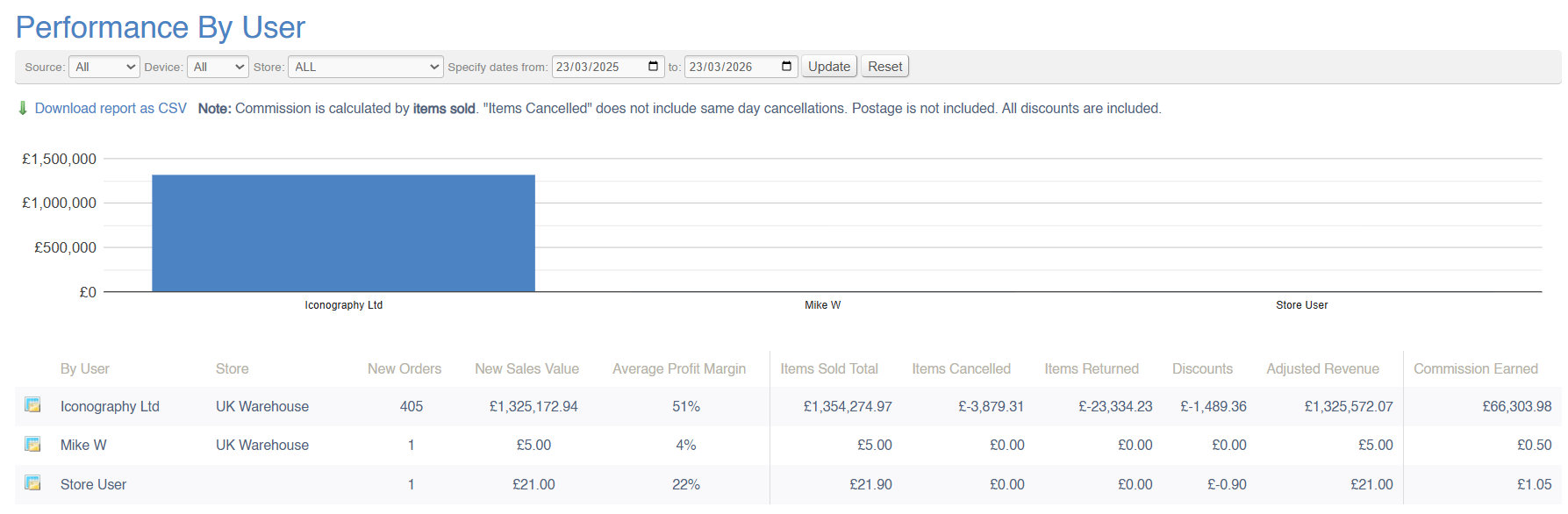
This report will show a breakdown of company-wide sales within a given period; the value of sales will be split by User (Salesperson). This list is based on the data you have set up in the Update Users menu. This report can also be used to calculate commission.
Sales Orders can each be attributed to a single Salesperson. This can be edited within the Sales Order management screen.
Sales Orders without a Salesperson will be omitted from this report.
Data Explanation
This report is split into two sections; 'sales data' and 'adjusted sales data'
Sales Data
This section of the report performs exactly like a standard Sales Report (see 'what is a sale'?). This includes:
| Field | Purpose |
| New Orders | Total number of new sales orders, e.g. sales orders created within the selected date range |
| New Sales Value | Total value of those new sales orders, e.g. sales orders created within the selected date range |
| Average profit margin | Average margin on those new sales orders, e.g. sales orders created within the selected date range |
Adjusted Total
These figures to the right of the first dividing line are adjusted figures; that means that they have been adjusted to take into account changes on a line by line basis. Rather than reflecting the Sales Order date, these figures reflect the date against the Sales Order line.
For example, a £1000 widget is sold on the 1st of May, creating a new Sales Order. On the 1st June, a second widget is added for £1000. The total value of that Sales Order is £2000, but it would only show as a new Sales Order on a report run on May's sales figures. If the report were run for June, the second widget would be included under 'items sold total'.
| Field | Purpose |
| Items sold total |
Total value of items sold within the period, based on 'date added' as stored against each Sales Order line
This is not based on the sales date of the Sales Order |
| Items cancelled | Total value of items cancelled against Sales Order where 'date cancelled' (stored against the Sales Order line) is within the selected date range |
| Items returned | Total value of items returned against Sales Order where 'date returned' (stored against the Sales Order line) is within the selected date range |
| Discounts | Total value of discounts on Sales Order lines where 'date added' (stored against the Sales Order line) is within the selected date range |
| Adjusted Revenue | The sum of the preceding columns |
Commission
This column shows the commission due to each Sales Person.
Please ensure that you have spoken to Iconography to setup your commission rules
Commission is calculated user the commission rate set against each user in the Update Users screen:
1. As a percentage of the value of items sold
The commission for this period will be calculated as a percentage of the total value of items sold during the specified timeframe. However, deductions will be applied for any items that were either returned or cancelled within the same period. These deductions will be based on the data reflected in the 'Cancelled' and 'Returns' columns of the report. The final commission amount will be adjusted accordingly to ensure it reflects only completed and successful sales.
The report will be adjusted appropriately for items returned/cancelled during that time period for all orders, regardless of when they are placed.
2. As a percentage of the value of items delivered
The commission for this period will be calculated as a percentage of the total value of items delivered during the specified timeframe, based on the delivery date. Deductions will be made for any items that were returned within the same period, as indicated in the 'Returns' column of the report. The final commission amount will be adjusted to reflect only those sales where the items were successfully delivered and not returned.
The report will be adjusted appropriately for items returned during that time period for all orders, regardless of when they are placed.
3. As a percentage of the value of payments
The report will be adjusted appropriately for refunds during that time period for all orders, regardless of when they are placed.
Returns, Refunds, Cancellations and Clawbacks
Sales Data:
Filters
This report may be filtered by:
- Source
- Device
- Store
- Date Range
Key to icons
 = view sales from this User in the Sales by Category report (matching any other filters applied)
 = download report
For more information on margin calculation, click here
FAQs
FAQs for Sales Reports may be viewed here.