
Summary
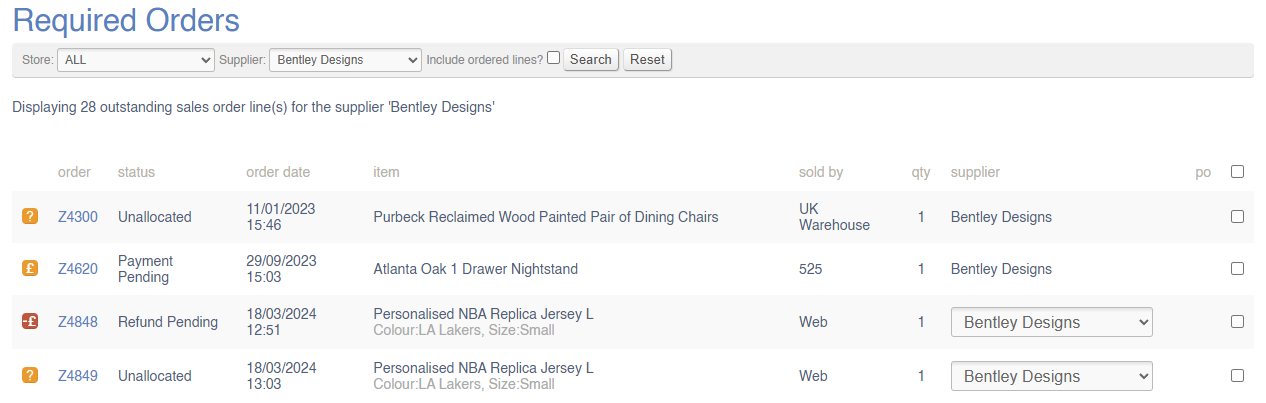
View all items required to fulfil Sales Orders.
Criteria
Sales Order lines will display here if:
- The Sales Order is active, e.g. is not a Draft or Quote, Cancelled, Completed or Returned
- The Sales Order Line has not been delivered, cancelled or returned
- There are no units of stock in the system that can be used to fulfil the Sales Order line
- The Sales Order Line has not been linked to an active Purchase Order already
- The SKU is linked to a Supplier which is enabled for Purchase Orders
Awaiting action orders show in Required Orders (although they can not be ordered until the status is cleared)
Filters
You can filter this screen by:
- Selling Store - this is the Store that is linked to the Sales Order
- Supplier - Sales Order Lines will show here if the Product is linked to that Supplier (note that a single Product line may be linked to multiple Suppliers)
- Ordered Lines - by default these are excluded from the list, but with this, you can review and potential resubmit previous Purchase Orders
Creating Purchase Orders
Click here for instructions.
FAQs
Can I create a single Purchase Order for multiple Sales Order Lines and Customers?
Yes. To achieve this, you need to enable Purchase Order Collation against the Supplier.
Can I ensure that each Sales Order will have a unique Purchase Order?
Yes. To achieve this, you need to disable Purchase Order Collation against the Supplier.
Can I request a drop ship (DHD) direct to my Customer?
Yes. You will need to use the drop down in the Supplier column on the Required Orders screen to do this. If the drop down does not appear, please ensure that the Sales Order has a delivery address and that the Supplier is enabled for dropship.
How does Default Receiving Store work?
If this is set against the Store, then Purchase Orders created from Required Orders will default to being delivered to that Default Receiving Store, rather than being delivered directly to the selling Store.
If multiple lines are needed for multiple Sales Orders, from different Stores that share the same Default Receiving Store, will these be merged into a single Purchase Order?
Sometimes.
If you are Purchasing multiple items for different Sales Orders, these will only be merged into a single Purchase Order if they are all from the same Supplier, and that supplier has Purchase Order Collation enabled against the Supplier.
If those Sales Orders are from different Stores, then they would only be merged if they share the same Default Receiving Store (set against the Store); otherwise those Purchase Orders will be delivered directly to the Stores.